 Customer Hub
Access Point Name configuration
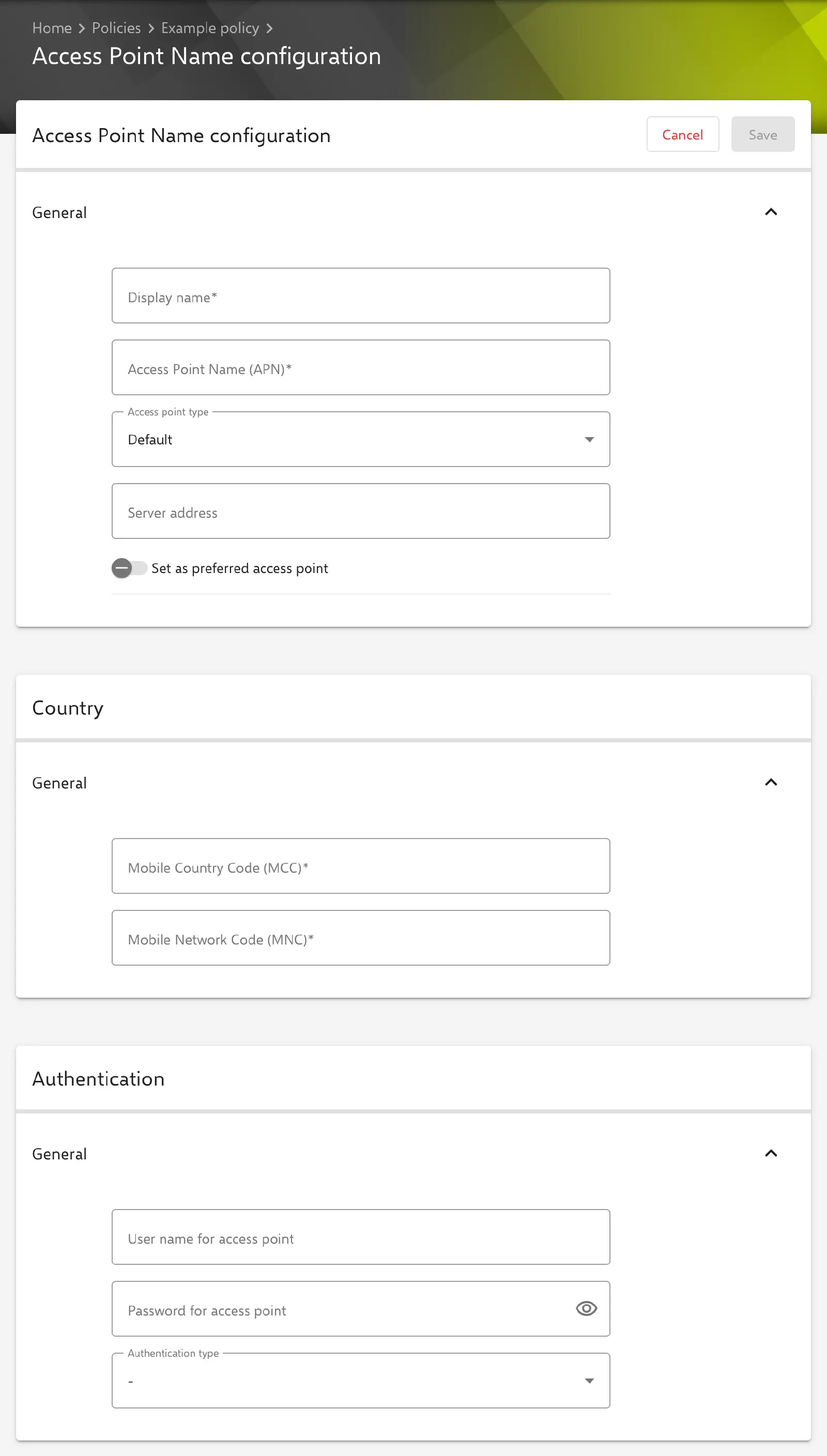
The Access Point Name configuration transfers a mobile access point (APN) to Android Classic devices. The configuration defines which mobile network the access point applies to, how the device authenticates and whether an MMS server, a proxy or a mobile virtual network operator (MVNO) is used.
Prerequisites
- The configuration is available in Android policies for Android Classic devices. A policy can contain several configurations, e.g. for different mobile carriers or access point types. If several policies apply to a device, the enabled access point configurations of all policies are transferred.
- The configuration is intended for Samsung devices with Samsung Knox. Whether and how a device applies the settings depends on the manufacturer, model and Android version.
General
The first section contains the basic data of the access point.
- Display name: Name of the access point. Required.
- Access Point Name (APN): The access point name specified by the mobile carrier, e.g.
internet.example.com. Required. - Access point type: Purpose of the access point. Default value Default.
- Default: mobile data connection.
- Multimedia Messaging System (MMS): sending and receiving MMS.
- Secure User Plane Location (SUPL): network-assisted positioning.
- Server address: Address of the server specified by the mobile carrier for the access point. Optional.
- Set as preferred access point: The device uses this access point preferentially. Disabled by default.
Country
The mobile country code and the mobile network code determine which mobile network the access point applies to. Both fields are required and may only contain digits.
- Mobile Country Code (MCC): exactly three digits, e.g.
262for Germany. - Mobile Network Code (MNC): two or three digits, e.g.
01.
Authentication
The fields are optional and are only needed if the mobile carrier requires authentication at the access point.
- User name for access point: User name for authentication.
- Password for access point: Password for authentication. A stored password is not displayed in the form but masked (
*****). If the field remains unchanged when editing, the stored value is kept; a newly entered value replaces it. - Authentication type: Authentication method. The options are None, CHAP, PAP, PAP/CHAP and -. The default value is -; in this case the configuration does not specify a method.
Multimedia Messaging Service (MMS)
The fields are optional and available regardless of the Access point type. They are usually needed for access points of the type Multimedia Messaging System (MMS).
- Server address (MMSC): Address of the carrier’s MMS centre.
- MMS port number: Port for MMS, 1 to 65535.
- MMS proxy address: Address of the MMS proxy.
Proxy server
The fields are optional.
- Proxy address: Address of the proxy server through which the access point’s traffic is routed.
- Proxy port: Port of the proxy server, 1 to 65535.
Mobile Virtual Network Operator (MVNO)
Virtual network operators use the network of another carrier and therefore its MCC and MNC. The MVNO settings restrict the access point to SIM cards of a specific virtual network operator.
- MNVO type: Attribute by which the SIM card of the virtual network operator is recognised. Required, default value None (default). Further options are Group Identifier level 1 (GID), International Mobile Subscriber Identity (IMSI) and Service Provider Name (SPN).
- MVNO value: Value of the selected attribute, e.g. the service provider name. Optional.
Advanced
- Protocol: IP protocol of the data connection in the home network. The options are IPv4 (default), IPv6 and IPv4/IPv6. Default value IPv4 (default).
- Roaming protocol: IP protocol of the data connection while roaming, with the same options and the same default value.
Special notes
- Placeholders: The text fields can contain user placeholders that are resolved per device during transfer. The form lists the available placeholders below the input fields (see Advanced placeholders →).
- Compliance: If a device reports that an access point configuration could not be applied, Relution records this as the compliance violation APN configuration.
Related topics
- WiFi →
- VPN →
- Device connectivity (Android Enterprise) →
- Advanced placeholders →
- Policies explained →
- Overview →