 Customer Hub
VPN
The VPN configuration transfers VPN profiles to Android Classic devices. PPTP, L2TP over IPSec and IPSec with XAuth, hybrid RSA or IKEv2 are supported, each with a pre-shared key or a certificate. In addition, the configuration defines whether a profile stays connected permanently as always-on VPN and whether users may create their own profiles or change the transferred ones.
Prerequisites
- The configuration is available in Android policies for Android Classic devices and can be added once per policy. A configuration can contain any number of VPN profiles.
- The policy also requires an enabled Passcode → configuration. If it is missing or disabled, the policy version can neither be published nor tested; the Publish and Test buttons state “A passcode configuration is missing to apply the VPN configuration” as the reason.
- If several policies with an enabled VPN configuration apply to a device, Relution transfers only one of them. The profiles of several configurations are not merged.
- Which VPN types and settings a device applies depends on the manufacturer and the Android version.
Global settings
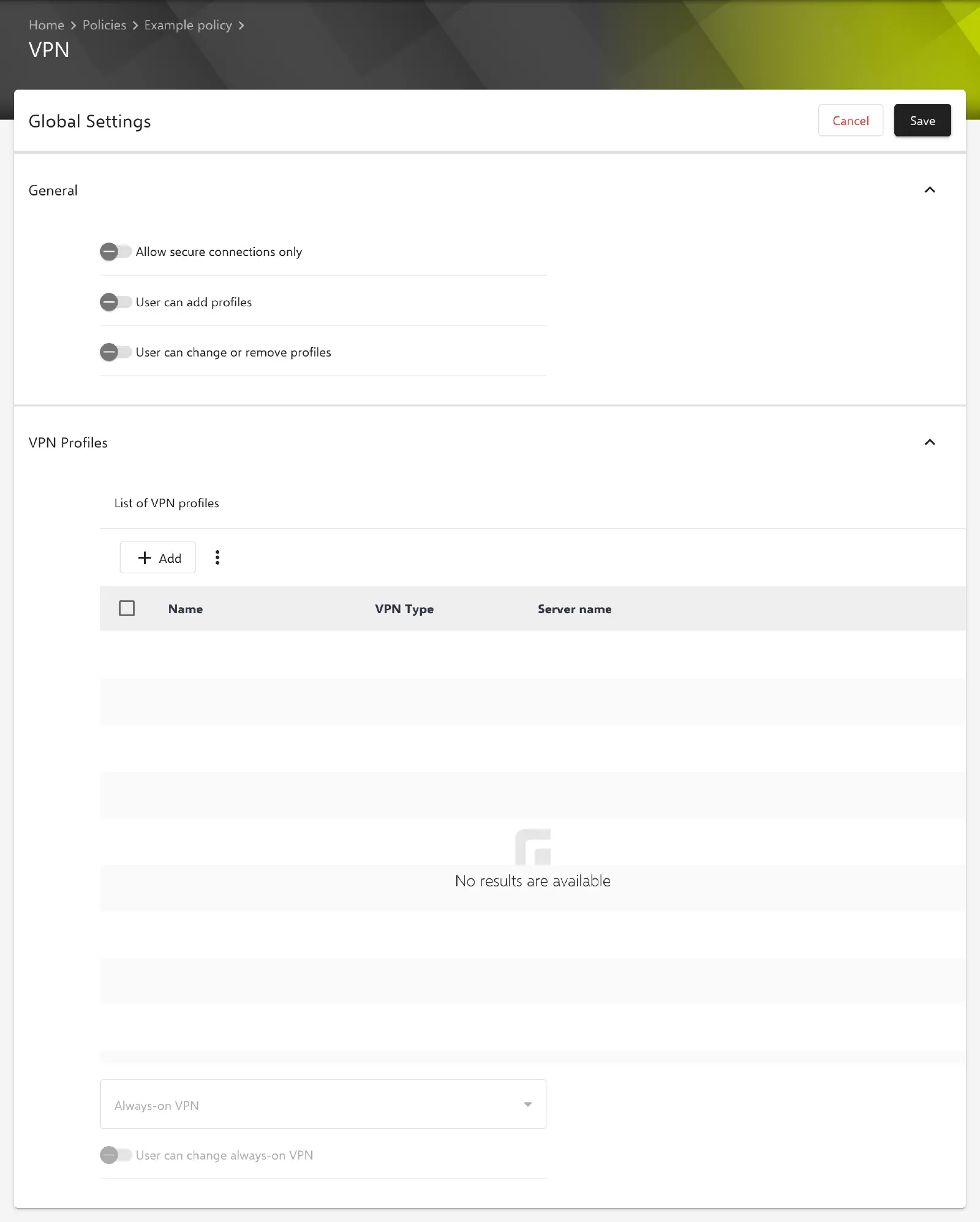
The General section of the configuration page shows three switches that apply to all profiles. All three are disabled by default.
- Allow secure connections only: The device only allows VPN connections that it classifies as secure.
- User can add profiles: The user may create their own VPN profiles on the device.
- User can change or remove profiles: The user may edit or remove the VPN profiles on the device.
VPN profiles
The VPN Profiles section lists the profiles of the configuration with Name, VPN Type and Server name. Add creates a new profile; the context menu of an entry is used to edit or delete it. Changes to profiles only take effect when the configuration is saved with Save; the profile dialog merely returns to the list.
- Always-on VPN: selection of a profile from the list that stays connected permanently. Optional.
- User can change always-on VPN: The user may change the always-on setting on the device. Disabled by default.
Both fields are only available once the configuration contains at least one profile. The profile selected under Always-on VPN must exist in the list when saving. If it is deleted or renamed, Relution rejects saving until the selection is adjusted.
VPN profile
The Add profile or Update profile dialog contains the General and Advanced Options sections. The General section provides the following fields:
- Name: name of the profile. Required. The name is also used for the Always-on VPN selection.
- Server name: host name or IPv4 address of the VPN server without protocol, e.g.
vpn.example.com. Required. - VPN Type: connection type. Required, default value PPTP. Further fields appear depending on the type (see below).
- Username and Password: credentials for signing in to the VPN server. Optional. With IPSec (IKEv2 PSK) and IPSec (IKEv2 RSA), both fields are displayed but their values are not saved.
VPN types
| VPN Type | Additional fields |
|---|---|
| PPTP | Enable PPTP Encryption (disabled by default) |
| L2TP (IPSec RSA) | IPSec CA Certificate, IPSec User Certificate, L2TP Secret (optional) |
| L2TP (IPSec PSK) | L2TP Secret (optional), IPSec Identifier (optional), IPSec Pre Shared Key |
| IPSec (XAuth PSK) | IPSec Identifier (optional), IPSec Pre Shared Key |
| IPSec (XAuth RSA) | IPSec CA Certificate, IPSec User Certificate |
| IPSec (Hybrid-RSA) | IPSec CA Certificate, IPSec User Certificate |
| IPSec (IKEv2 PSK) | IPSec Identifier (optional), IPSec Pre Shared Key |
| IPSec (IKEv2 RSA) | IPSec CA Certificate, IPSec User Certificate, OCSP Server URL |
- IPSec Pre Shared Key: shared key for the IPSec connection. Required as long as no key is stored yet.
- IPSec Identifier: identifier the device uses to identify itself to the IPSec server.
- L2TP Secret: shared secret for the L2TP tunnel.
- OCSP Server URL: address of the OCSP server used to check the revocation status of certificates. Required; the value must be a valid URL.
If the VPN Type is changed, Relution only keeps the fields of the new type when saving. Stored keys that the new type does not use are discarded.
Certificates
The RSA types require two certificates. They are selected via Select from the Certificate Management →; certificate templates are not available for selection.
- IPSec CA Certificate: certificate of the certification authority the device uses to verify the server certificate. Required. Only certificates without a private key (PKCS#1) are offered.
- IPSec User Certificate: certificate the device uses to authenticate to the VPN server. Two options are available:
- Select certificate (default): a certificate with private key (PKCS#12) from the certificate management. Required.
- Use user certificate: a certificate of the VPN and apps category from the profile of the user assigned to the device is used (see User certificates →). If the user has several such certificates, the optional Certificate name field selects one of them; it may contain placeholders. If left blank, the longest-lived certificate is used. If no user certificate can be determined for a device, the profile is transferred without a user certificate.
Relution rejects expired certificates when saving. Certificates that do not belong to the organization of the policy are rejected as well.
Advanced options
The three lists are optional. Each entry is validated when it is added.
- Add DNS Server: DNS servers used during the VPN connection. Each entry must be an IPv4 address.
- Add Search Domains: domains appended during name resolution via the VPN, e.g.
example.com. Entries are specified without protocol. - Add Route Forwarding: destinations whose traffic is routed through the VPN. Each entry must be an IPv4 address.
Special notes
- Stored passwords and keys: As of Relution 26.5.5, Password, L2TP Secret and IPSec Pre Shared Key are no longer displayed in the form but masked (
*****). If a field is left unchanged when editing, the stored value is kept; a newly entered value replaces it. - Renaming a profile: Stored passwords and keys are assigned to the profile by its Name. After a profile has been renamed, they therefore have to be entered again.
- Export: If a profile uses a certificate from the certificate management, the VPN configuration is not included in the policy export →.
Related topics
- Passcode →
- Certificate →
- WiFi →
- Certificate Management →
- Advanced placeholders →
- Policies explained →
- Overview →