 Customer Hub
AirPlay
The AirPlay configuration defines to which AirPlay receivers (for example Apple TV or AirPlay-enabled displays) a device may stream content. In addition, the passwords of known AirPlay destinations can be stored so that no manual input is required on the device. Relution transfers the settings as a profile with the payload type com.apple.airplay.
Platforms
The configuration is available in policies for iOS/iPadOS and macOS. The form, the validation and the transferred profile are identical on both platforms.
- User enrollment: On both platforms, the configuration is also transferred to devices with user enrollment (badge Supports user enrollment).
- Supervision: Relution does not require a supervised device. According to Apple, the list of allowed AirPlay destinations only takes effect on supervised devices.
- iOS/iPadOS: The device acts as an AirPlay sender. Additional options are provided by the Restrictions configuration (see Related settings →).
- macOS: A Mac can also act as an AirPlay receiver itself. Whether it accepts incoming AirPlay requests is not defined by this configuration but by the Restrictions configuration for macOS.
- tvOS: This configuration is not available for Apple TV. Access to an Apple TV as an AirPlay receiver is controlled there by the AirPlay security → configuration.
Whether an operating system applies an individual setting is decided by Apple; Relution transfers the values unchanged.
Allowed AirPlay destinations
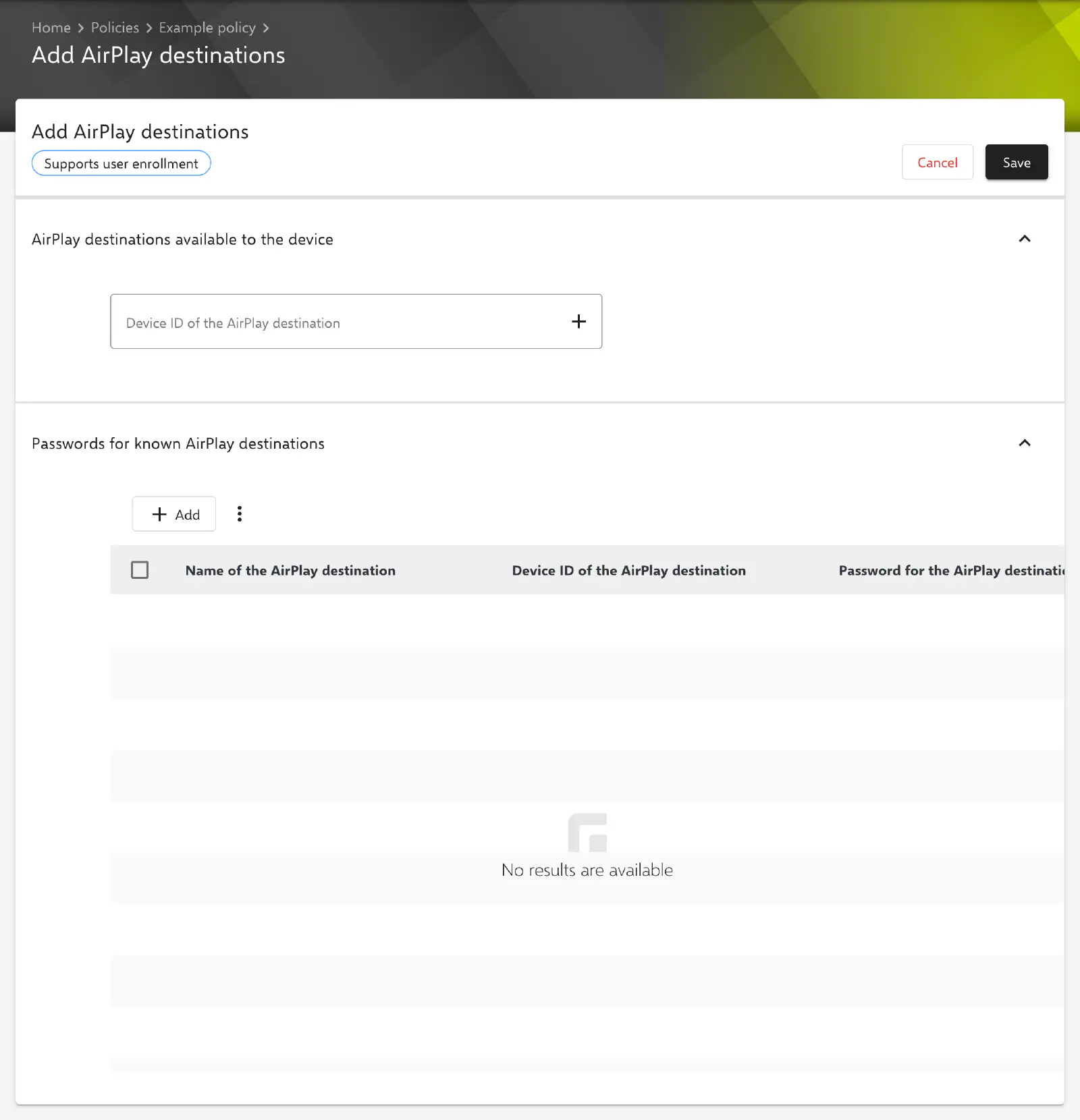
In the AirPlay destinations available to the device section, the AirPlay receivers available for selection on the device are entered. According to Apple, only the entered destinations are then available on supervised devices.
- Device ID of the AirPlay destination: device ID of the receiver in the format of a MAC address, for example
a1:b2:c3:d4:e5:f6. An entry is added to the list with the Enter key or via the plus icon and appears as a chip; the cross in the chip removes it again. The form does not accept duplicate entries.
The device ID is entered with colons as separators (xx:xx:xx:xx:xx:xx). Relution rejects other notations when saving with the message The Device ID should be in the following format xx:xx:xx:xx:xx:xx.
Passwords for known AirPlay destinations
In the Passwords for known AirPlay destinations section, AirPlay receivers that require a password are stored. The device uses the password when connecting to the respective destination, so no input is needed on the device.
The table shows the columns Name of the AirPlay destination, Device ID of the AirPlay destination and Password for the AirPlay destination. Add opens the Add password for an AirPlay destination dialog with the following fields:
| Field | Required | Description |
|---|---|---|
| Name of the AirPlay destination | yes | Name under which the receiver appears in the AirPlay menu, for example Meeting room 1. Maximum 255 characters. |
| Device ID of the AirPlay destination | yes | Device ID of the receiver in the format xx:xx:xx:xx:xx:xx. |
| Password | yes | AirPlay password of the receiver. The input is displayed masked. |
Confirm adds the entry to the table. Existing destinations can be changed via the context menu in the Name of the AirPlay destination column with Edit (dialog Edit password for an AirPlay destination, applied with Update) or removed with Delete. Several selected entries can be removed together via Delete in the menu of the table bar. Changes to the table only take effect when the configuration is saved.
Special notes
- Once per policy: Only one AirPlay configuration is possible per policy. All allowed destinations and all passwords are therefore entered in the same configuration.
- Both sections are optional: The configuration can contain only allowed destinations, only passwords, or both.
- Stored passwords: Since Relution 26.5.5, stored passwords are no longer displayed; the Password for the AirPlay destination column then shows
*****. When a destination is edited, the stored password is kept as long as the Password field remains empty. - Changing name and device ID: If only the name or only the device ID is changed while editing, the stored password is kept. If both are changed at the same time, the dialog requires a new password. The configuration cannot be saved without a password for every destination.
- No placeholders: The fields do not support user or device placeholders.
Related settings
The Restrictions configuration contains further AirPlay-related options:
- iOS/iPadOS: Force a pairing password for AirPlay requests from this device (see Restrictions for iOS →).
- macOS: Allow incoming AirPlay requests defines whether the Mac accepts requests as an AirPlay receiver (see Restrictions for macOS →).
In addition, AirPlay streaming to a specific receiver can be started or stopped via the device actions Request mirroring and Stop mirroring.
Related topics
- Restrictions for iOS →
- Restrictions for macOS →
- AirPlay security for tvOS →
- Available actions for iOS →
- Available actions for macOS →
- AirPrint →
- Configuration overview for iOS →
- Configuration overview for macOS →