 Customer Hub
Contact
The Contact configuration hands a CardDAV account to the native Contacts app via a configuration profile. Manual setup of the address book on the device is not required, and the username and password can be filled per user via placeholders. Relution transfers the values as the Apple payload com.apple.carddav.account.
The counterpart for calendars is the Calendar (CalDAV) → configuration.
Platforms
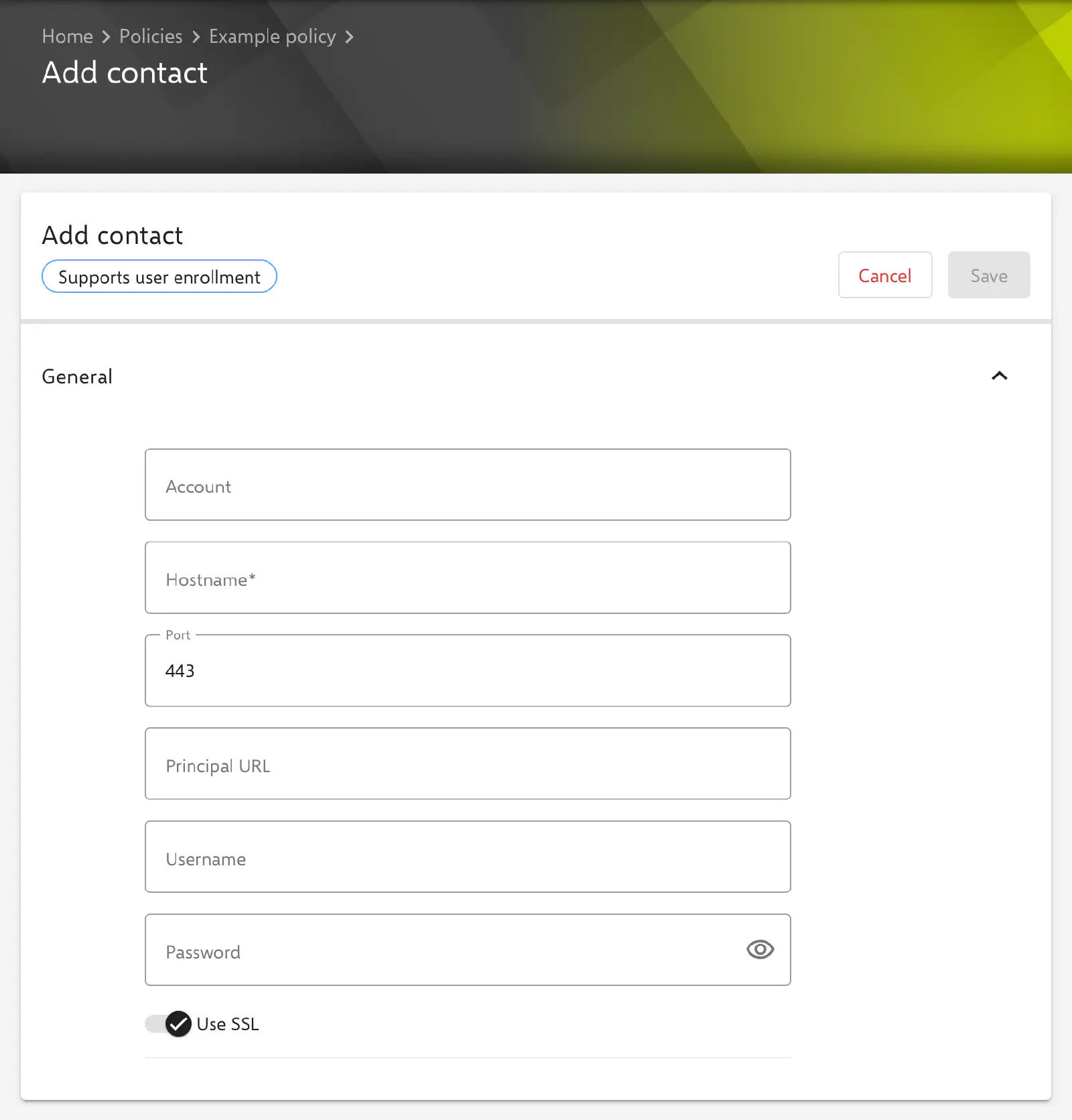
The configuration is available in policies for iOS/iPadOS and for macOS. A supervised device is not required. The form carries the badge Supports user enrollment: the configuration can also be distributed to devices with User Enrollment → and to Macs with User Enrollment →.
Several contact configurations are allowed per policy, for example for several address book servers. In the policy’s configuration list, each configuration appears with its Account.
On macOS and on Shared iPads, Relution delivers the configuration via the user channel. The account is therefore installed in the profile of the signed-in user and not device-wide. If the device does not support a user channel, delivery takes place via the device channel.
The form and its fields are identical on both platforms.
General
The General section contains all fields of the CardDAV account.
- Account: Display name of the account on the device and name of the configuration in the policy. Optional.
- Hostname (required): Address of the CardDAV server as a DNS name or IPv4/IPv6 address, without scheme, port and path (e.g.
contacts.example.com). - Port: Port of the CardDAV server. Prefilled with
443; values from1are permitted. - Principal URL: Optional URL of the user principal on the server, e.g.
https://contacts.example.com/remote.php/dav/principals/users/${user.name}/. The field is validated as a URL; an invalid entry is marked with “has to be a valid URL” and prevents saving. If the field remains empty, no URL is transferred. - Username: Username for signing in to the CardDAV server, fixed or via placeholders such as
${user.name}or${user.email}. Optional; if the field remains empty, no username is transferred. - Password: Password for signing in. Optional; if the field remains empty, no password is transferred and it is entered on the device.
- Use SSL: Connection via SSL/TLS. Enabled by default. If the switch is turned off, the connection is established unencrypted; with port
443, this usually fails.
443.Per account VPN
The CardDAV account can be referenced in a VPN configuration in the Per account VPN section, so that the connection to the contacts server is established via this VPN. The form of the Contact configuration then shows the notice “This configuration is referenced by a VPN configuration.” with the link Show the referenced configuration. Setting up the VPN is described under App to VPN Mapping →.
Special notes
- Stored passwords: Since Relution 26.5.5, a stored password is no longer displayed in the form; the field then shows
*****. If it remains unchanged, the stored password is kept. A newly entered password replaces the stored one; if the field is saved empty after an entry, the stored password is removed. - Placeholders: User placeholders such as
${user.name}or${user.email}can be used in the text fields and are resolved per device. Device placeholders are not available. The form lists the available placeholders below the settings. More information: Advanced placeholders → - Automatic discovery: Current Apple operating systems determine the address book according to RFC 6764 via a redirect under
/.well-known/carddavon the server. The server-side setup corresponds to that for CalDAV and is described under Server-side configuration of the redirect →.
Related topics
- Calendar (CalDAV) →
- Calendar (CalDAV) for macOS →
- Exchange →
- App to VPN Mapping →
- Advanced placeholders →
- User Enrollment →
- Configuration overview →