 Customer Hub
Encrypted DNS settings
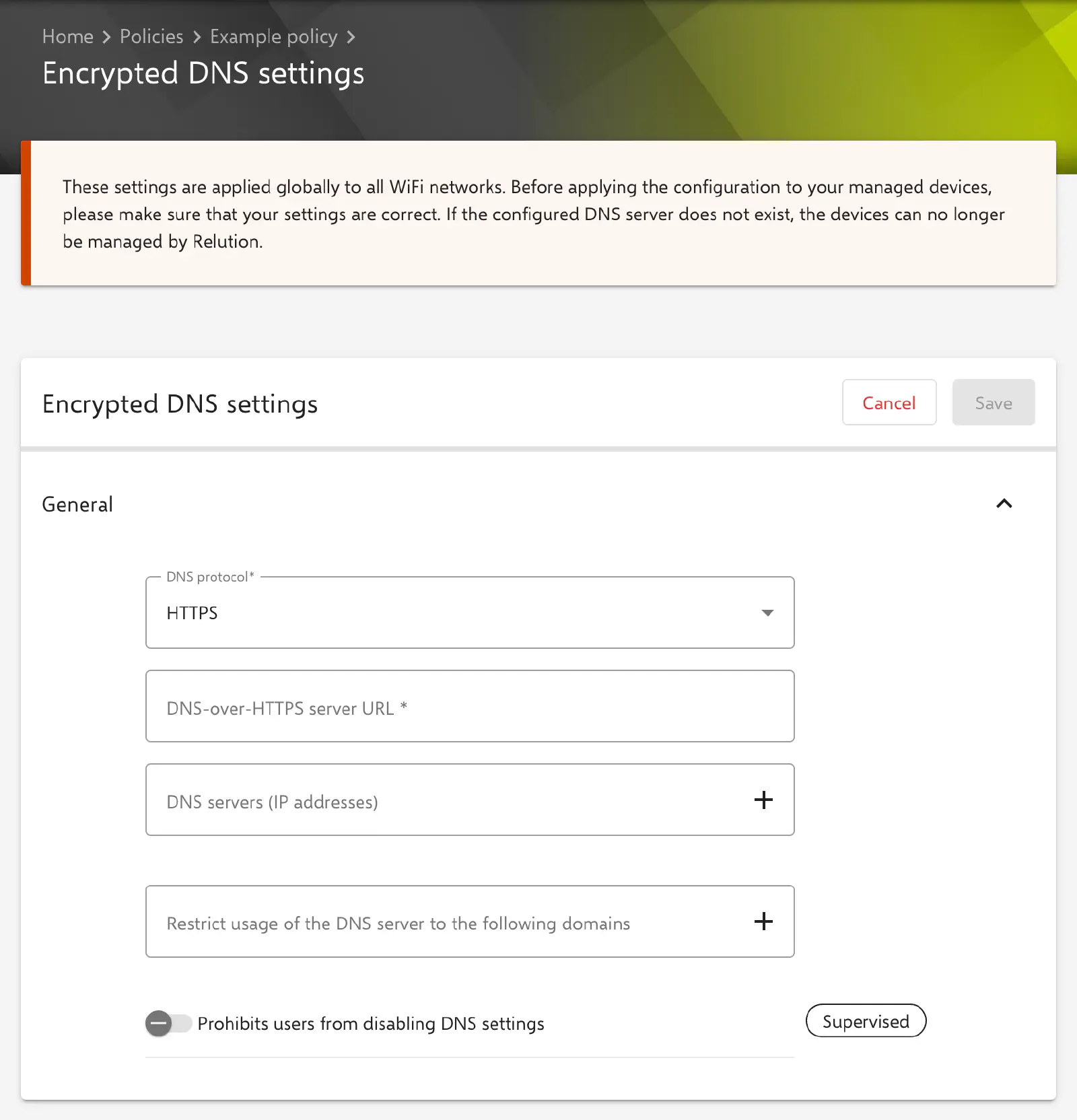
The Encrypted DNS settings configuration defines a DNS server that the devices use for encrypted name resolution, either via DNS-over-HTTPS (DoH) or via DNS-over-TLS (DoT). Optionally, use of the server can be limited to specific domains. Relution transfers the settings as a profile with the payload type com.apple.dnsSettings.managed.
According to the notice in the form, the settings apply to all Wi-Fi networks. If the configured DNS server does not exist, the devices can no longer be managed by Relution. The entries should therefore be checked carefully before distribution, ideally on a test device first.
Platforms
The configuration is available in policies for iOS/iPadOS and for macOS; the form and behavior are the same on both platforms.
- It is only available for devices with device enrollment, not for devices with User Enrollment (iOS →, macOS →).
- A supervised device is not required. Only the option Prohibits users from disabling DNS settings requires a supervised device (label Supervised).
- In macOS policies, the configuration is labeled macOS 11+. According to Apple, the settings are supported from iOS 14 and macOS 11.
General
The General section contains the following fields. The key in the profile is given in brackets.
- DNS protocol (
DNSProtocol, default:HTTPS): defines the encrypted transport protocol.HTTPSstands for DNS-over-HTTPS,TLSfor DNS-over-TLS. Depending on the selection, one of the two following fields appears. - DNS-over-HTTPS server URL (
ServerURL, only withHTTPS): URI template of the DoH server, e.g.https://dns.example.com/dns-query. Required. The URL must use thehttps://scheme. The hostname or address in the URL is used to validate the server certificate and, if no IP addresses are specified, to determine the server addresses. - DNS-over-TLS server hostname (
ServerName, only withTLS): hostname of the DoT server, e.g.dns.example.com. Required. A hostname is expected, not an IP address. It is used to validate the server certificate and, if no IP addresses are specified, to determine the server addresses. - DNS servers (IP addresses) (
ServerAddresses): optional list of IP addresses of the DNS server; IPv4 and IPv6 can be mixed. If the list is empty, the device determines the addresses from the hostname or the URL. - Restrict usage of the DNS server to the following domains (
SupplementalMatchDomains): optional list of domains. Only queries for these domains go through the configured server; if the list is empty, the server applies to all domains. A single wildcard prefix*.is allowed but not required: according to Apple, both*.example.comandexample.commatchintranet.example.com, but notintranet-example.com. - Prohibits users from disabling DNS settings (
ProhibitDisablement, default: off): the user cannot turn off the DNS settings on the device. Relution only transfers the key to supervised devices; on unsupervised devices it is omitted.
The form does not offer further options of the Apple profile, such as on-demand rules or a client certificate.
Special notes
- Multiple configurations: A policy can contain several configurations of this type. In the configuration list, each one is named after its DNS-over-HTTPS server URL or DNS-over-TLS server hostname.
- Protocol change: Only the field belonging to the selected DNS protocol is transferred, i.e. either the server URL or the hostname.
- Placeholders: Below the settings, the form shows the available user and device placeholders. Since hostname, IP addresses and domains are validated for their format, placeholders can only be used in the path of the DNS-over-HTTPS server URL. More information: Advanced placeholders →
Related topics
- WiFi →
- VPN →
- Web Content Filter →
- Global HTTP Proxy →
- Proxies (macOS) →
- Advanced placeholders →
- Configuration overview (iOS) →
- Configuration overview (macOS) →