 Customer Hub
SCEP
The SCEP configuration lets a device request a certificate from a SCEP server via the Simple Certificate Enrollment Protocol, e.g. from Microsoft NDES or another certificate authority with a SCEP interface. The device generates the key pair itself, and the private key never leaves the device. Relution transfers the settings as a profile with the payload type com.apple.security.scep.
Prerequisites
- A SCEP server is reachable from the device.
- If the SCEP server requires a challenge password, a fixed value is known that applies to all devices of the policy.
- Supervision is not required. The portal labels the configuration with Supports user enrollment, so it is also available for devices with User Enrollment →.
The configuration can be added to a policy multiple times, e.g. for certificates from different certificate authorities.
Platforms
The configuration is available in iOS and macOS policies with the same form. iPadOS devices are managed via iOS policies. The configuration is not offered for tvOS, watchOS and visionOS.
Configuration
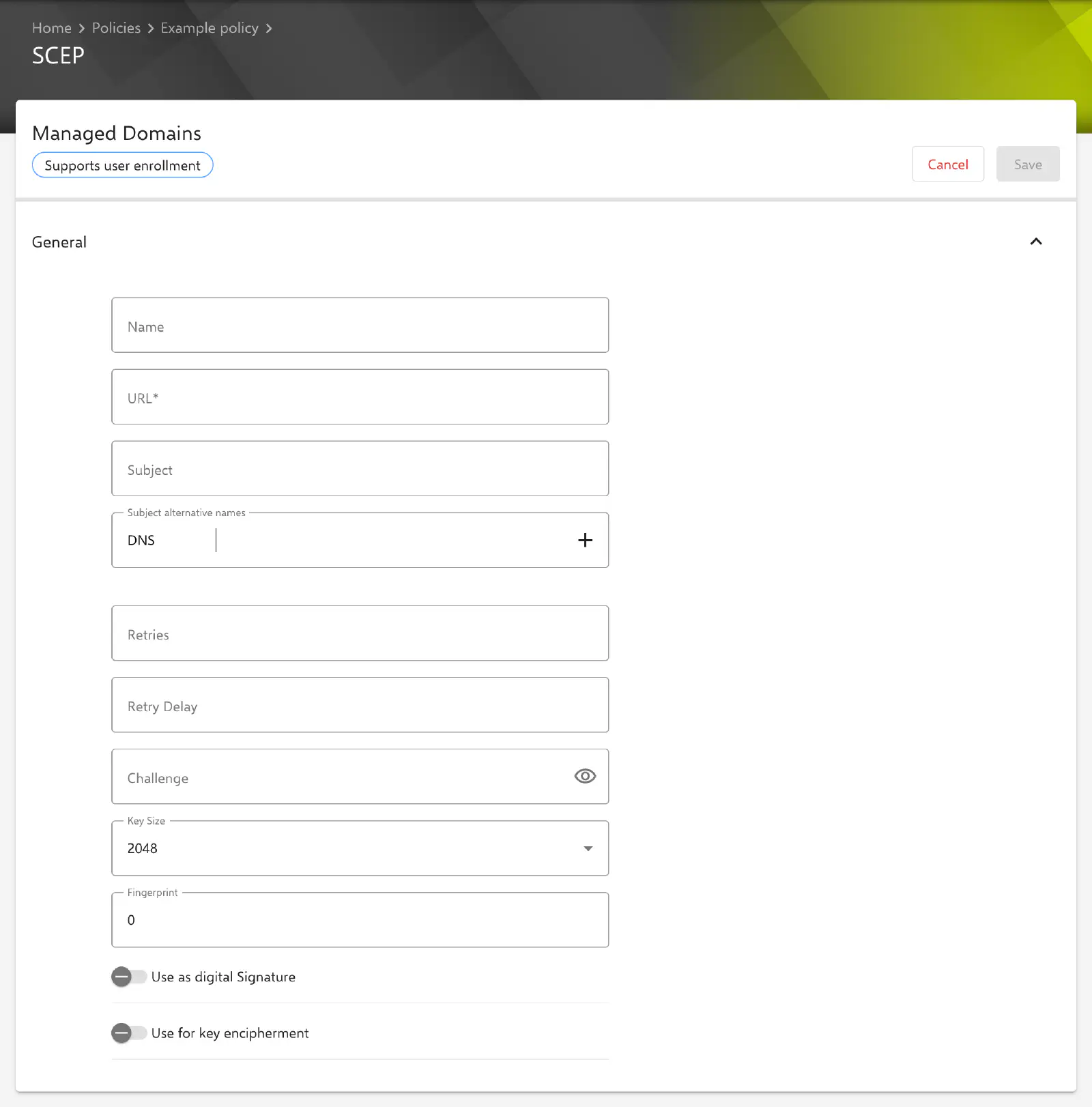
Under Devices → Policies, the SCEP configuration is created in an iOS or macOS policy via Add. All fields are located in the General section.
| Field | Description |
|---|---|
| Name | Optional, at most 255 characters. Name of the CA instance (CA-IDENT) expected by the SCEP server, for example if it provides several certificate authorities. An empty field is not transferred. |
| URL | Required. Base URL of the SCEP server, e.g. https://pki.example.com/certsrv/mscep/mscep.dll. The portal only accepts a valid URL. |
| Subject | Optional, at most 255 characters. Subject of the certificate as an X.500 name, e.g. CN=iPhone-Sales, OU=IT, O=Example Ltd, C=DE. The components are transferred in the order entered. |
| Subject alternative names | Optional. Any number of additional names in the certificate, see Subject alternative names →. |
| Retries | Optional, 0 to 999. Number of polls to the SCEP server while the server reports the request as pending. An empty field is not transferred. |
| Retry Delay | Optional, 0 to 999. Waiting time in seconds between two polls. An empty field is not transferred. |
| Challenge | Optional, at most 255 characters. Challenge password (pre-shared secret) the device uses to authenticate to the SCEP server. |
| Key Size | Length of the RSA key: 1024, 2048 (default) or 4096 bits. |
| Fingerprint | Fingerprint of the CA certificate as a hex string, used by the device to verify the CA certificate delivered by the SCEP server. Default 0: no fingerprint is transferred. |
| Use as digital Signature | Toggle, disabled by default. See Key usage →. |
| Use for key encipherment | Toggle, disabled by default. See Key usage →. |
Subject alternative names
An entry consists of a type and a value. New entries are preset with the type DNS. The following types are available:
| Type in the portal | Transferred as |
|---|---|
| DNS | dNSName |
| User Principal Name (UPN) | ntPrincipalName |
rfc822Name | |
| URI | uniformResourceIdentifier |
Entries without a value are not transferred. An entry with the same type and value cannot be added twice. Several entries of the same type are transferred together.
Key usage
The two toggles determine the key usage the device specifies in the certificate request:
| Use as digital Signature | Use for key encipherment | Transferred value |
|---|---|---|
| off | off | 0 |
| on | off | 1 (signing) |
| off | on | 4 (encryption) |
| on | on | 5 (signing and encryption) |
Special notes
- Challenge: As of Relution 26.5.5, a stored challenge is no longer displayed in the form, only indicated by
*****. If the field remains unchanged, Relution keeps the stored value. A new entry replaces it. To remove it, the content of the field is deleted so that the placeholder*****is no longer displayed, and the configuration is saved. - Fixed challenge: The value entered is transferred unchanged to all devices of the policy. This configuration does not generate a challenge per device or a one-time challenge.
- Fingerprint: A hex string without separators such as
:or spaces is expected. Although the portal accepts the prefix0x, a full-length fingerprint (e.g. 40 characters) is entered without0x. - Fixed values: Relution always transfers the following settings, which cannot be changed in the form: key type RSA, no access for all apps to the private key (
AllowAllAppsAccess=false) and export of the private key allowed (KeyIsExtractable=true). - Placeholders: The form does not list any available placeholders. Placeholders such as
${user.email}or${device.serialnumber}in text fields, e.g. in Subject or Subject alternative names, are nevertheless replaced for the respective device when the profile is generated. A test on a test device before the rollout is recommended. More information: Advanced placeholders → - Validation on save: Without a URL, the configuration cannot be saved. If Subject is not a valid X.500 name, the portal shows The LDAP expression is invalid, and the server rejects the configuration.
- Compliance: If the device reports an error during installation, a compliance violation SCEP configuration appears.
Relation to certificate authorities
The SCEP configuration works independently of the certificate authorities stored under Settings → Certificate Authorities. The device contacts the URL entered directly. Certificates issued this way therefore do not appear under Settings → Issued Certificates, and Relution can neither renew nor revoke them.
For certificates managed by Relution itself, a certificate template with the template type SCEP on device is available. It is included via the Certificate configuration or in Wi-Fi and VPN configurations. Relution generates the SCEP settings per device from it, including the challenge, and additionally offers settings such as automatic renewal and access to the private key. More information: Built-In CA →
Behavior on the device
The following behavior is determined by Apple or the certificate authority, not by Relution; the information is provided without guarantee:
- If Retries and Retry Delay remain empty, the device uses the operating system defaults.
- Whether a Key Size is accepted is decided by the certificate authority.
1024bits is no longer considered secure and is rejected by many certificate authorities. - Some certificate authorities issue only one of the two key usages per certificate, not both at the same time. Which usage the issued certificate actually contains is determined by the template on the certificate authority.
- If the configuration is removed from the policy, the device also removes the requested certificate together with the profile.
Related topics
- Certificate →
- WiFi →
- VPN →
- Available configurations (iOS) →
- Available configurations (macOS) →
- Built-In CA →
- Certificate Management →
- Advanced placeholders →