 Customer Hub
Time zone
The Time zone configuration sets a fixed time zone on supervised devices. This is particularly useful where a device cannot determine its time zone itself, for example because Location Services are turned off. Relution does not transfer the setting as a profile but with the MDM command Settings (item TimeZone).
Prerequisites
- The configuration can be added once per policy.
- The setting is intended for supervised devices; the portal marks the configuration with the badge Supervised. Supervised devices are typically devices from Automated Device Enrollment (ADE, DEP in the portal) as well as iPhones and iPads that were supervised via Apple Configurator (see Supervising retroactively →).
- On iOS/iPadOS, the configuration is only available for devices with device enrollment, not for devices with User Enrollment →.
- Force Automatic Date and Time must not be enabled in the Restrictions → of the same policy (see Special notes →).
Platforms
The configuration is available in policies for iOS/iPadOS and tvOS. The form and the transferred command are the same on both platforms.
- iOS/iPadOS: The portal marks the configuration with Supervised.
- tvOS: The portal marks the configuration with tvOS 14+ and Supervised. The configuration is not limited to device enrollment, as there is no User Enrollment for Apple TV. The relevant option here is Force Automatic Date and Time in the tvOS restrictions →.
Whether and from which operating system version a device applies the setting is decided by Apple; according to Apple, the time zone can be set via MDM as of iOS/iPadOS 14 and tvOS 14.
General
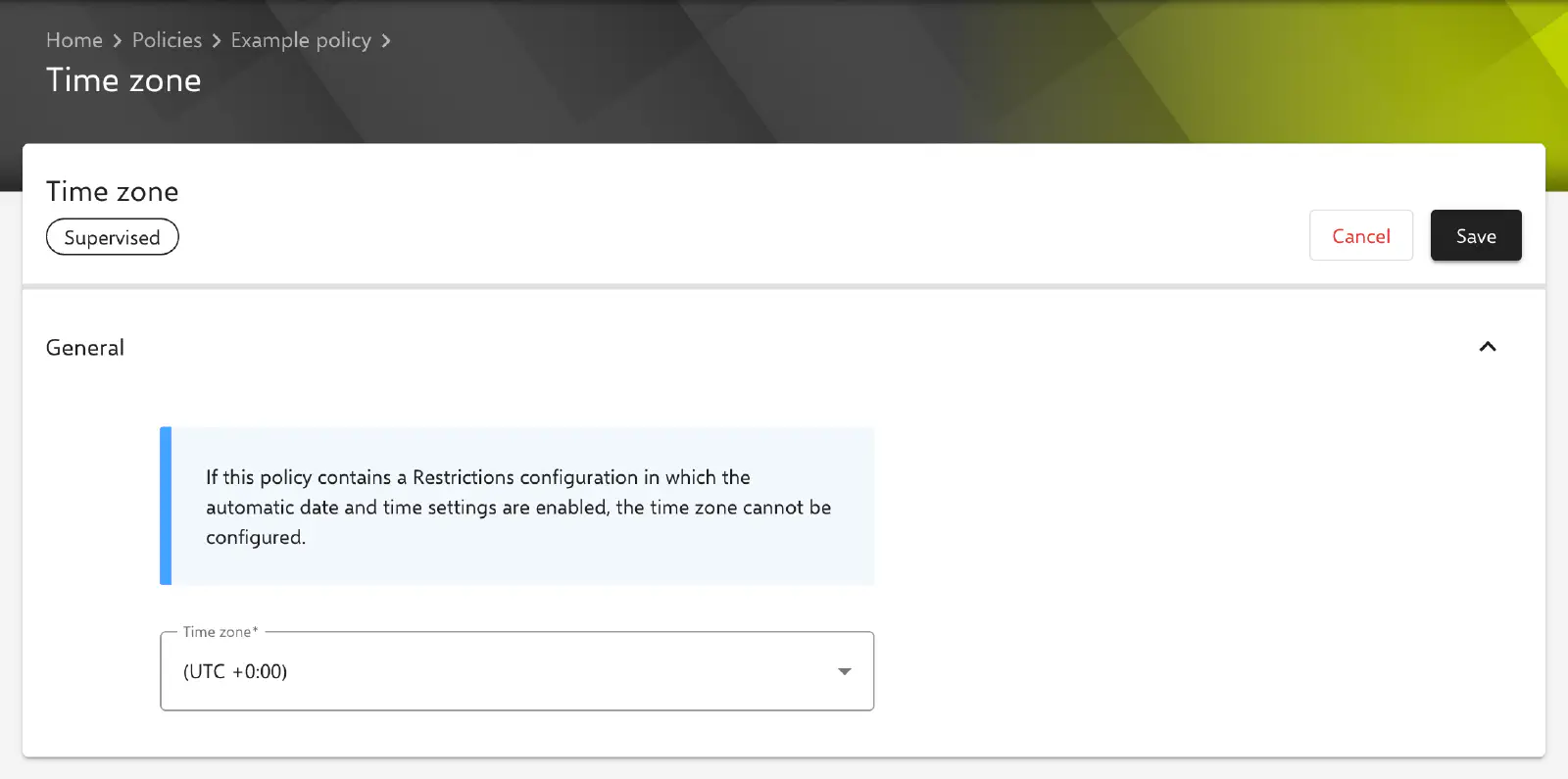
The configuration is created under Devices → Policies in an iOS or tvOS policy via Add Configuration → Time zone. The General section contains a notice about the Restrictions configuration and a single field:
- Time zone: Time zone that is set on the device. Required field. The default value in a new configuration is (UTC +0:00). The selection is made from a fixed list; the name of the time zone is transferred in the notation of the IANA time zone database, e.g.
Europe/Paris.
For Germany, Austria and Switzerland, the entry (UTC +01:00/+02:00) Europe/Paris corresponds to the local time there (CET/CEST), including the daylight saving time change. This configuration has no further fields, placeholders, passwords or certificate references.
Selectable time zones
| Display in the portal | Transferred value |
|---|---|
| (UTC +13:00) Pacific/Apia | Pacific/Apia |
| (UTC +12:00/+13:00) Pacific/Auckland | Pacific/Auckland |
| (UTC +11:00) Pacific/Guadalcanal | Pacific/Guadalcanal |
| (UTC +10:00/+11:00) Australia/Sydney | Australia/Sydney |
| (UTC +09:30) Australia/Darwin | Australia/Darwin |
| (UTC +09:00) Asia/Tokyo | Asia/Tokyo |
| (UTC +08:00) Asia/Shanghai | Asia/Shanghai |
| (UTC +07:00) Asia/Ho Chi Minh | Asia/Ho_Chi_Minh |
| (UTC +06:00) Asia/Dhaka | Asia/Dhaka |
| (UTC +05:30) Asia/Kolkata | Asia/Kolkata |
| (UTC +05:00) Asia/Karachi | Asia/Karachi |
| (UTC +04:00) Asia/Yerevan | Asia/Yerevan |
| (UTC +03:00) Africa/Addis Ababa | Africa/Addis_Ababa |
| (UTC +02:00) Africa/Harare | Africa/Harare |
| (UTC +02:00/+03:00) Africa/Cairo | Africa/Cairo |
| (UTC +01:00/+02:00) Europe/Paris | Europe/Paris |
| (UTC +0:00) | UTC |
| (UTC -02:30/-03:30) America/St. Johns | America/St_Johns |
| (UTC -03:00) America/Argentina/Buenos Aires | America/Argentina/Buenos_Aires |
| (UTC -03:00) America/Sao Paulo | America/Sao_Paulo |
| (UTC -04:00) America/Puerto Rico | America/Puerto_Rico |
| (UTC -04:00/-05:00) America/Indiana/Indianapolis | America/Indiana/Indianapolis |
| (UTC -05:00) | -05:00 |
| (UTC -05:00/-06:00) America/Chicago | America/Chicago |
| (UTC -07:00) America/Phoenix | America/Phoenix |
| (UTC -07:00) | -07:00 |
| (UTC -07:00/-08:00) America/Los Angeles | America/Los_Angeles |
| (UTC -08:00/-09:00) America/Anchorage | America/Anchorage |
| (UTC -10:00) | -10:00 |
Special notes
- Not enforced: According to the portal notice, the time zone is set on the device but not enforced. Setting it turns off the automatic time zone determination; the time zone can still be changed on the device, however, for example by turning Set Automatically back on under
Settings→General→Date & Time. - Interaction with the restrictions: If the option Force Automatic Date and Time is turned on in an active Restrictions configuration on the device, Relution does not transfer the time zone. The two settings are mutually exclusive: either the device determines date, time and time zone itself, or the time zone is set to a fixed value.
- No profile: As the setting is transferred by command, it does not appear in the device’s profile list. Relution sends the command when the policy is installed or updated on the device.
- Removing the configuration: A
Settingscommand cannot be undone. If the configuration is removed from the policy, the device keeps the time zone last set until it is changed on the device or by a new configuration.
Related topics
- Restrictions (iOS) →
- Restrictions (tvOS) →
- Device settings →
- Supervising retroactively →
- Overview of iOS configurations →
- Overview of tvOS configurations →