 Customer Hub
Accounts
The Accounts configuration defines whether guests without their own user account may log in to managed Macs and how macOS handles mobile accounts. Mobile accounts are locally cached copies of network accounts, for example from an Active Directory, which allow logging in even without a connection to the directory service. Relution transfers the settings as a profile with the payload type com.apple.MCX.
Prerequisites
- The configuration can be added once per policy.
- It is only available for devices with device enrollment, not for devices with User Enrollment →.
- Relution does not check for a minimum macOS version.
- A supervised device is not required.
- The options in the Mobile Account section only apply to network users. For this, the Mac must be bound to a directory service, for example via the Active Directory → configuration.
Guest Account
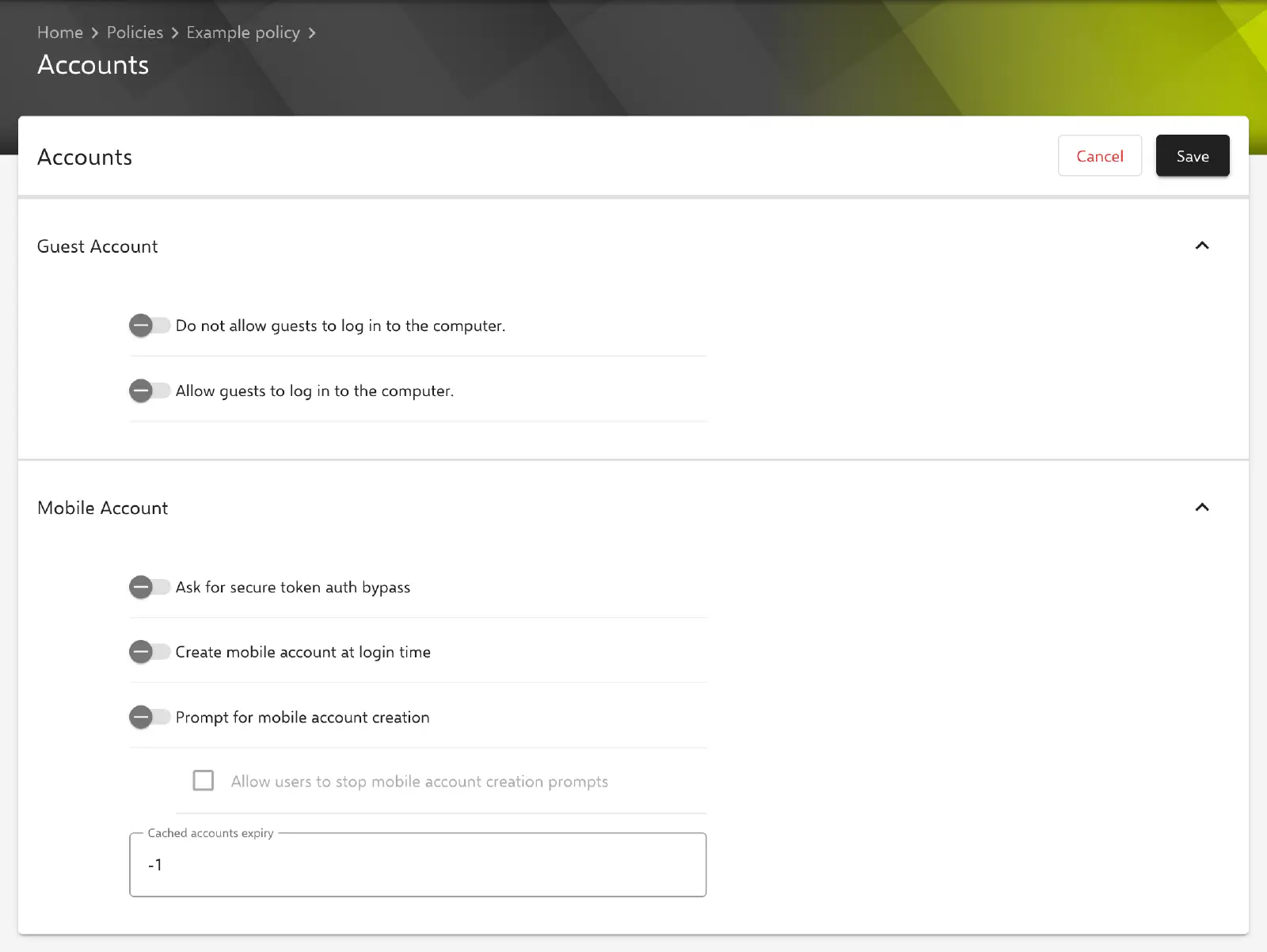
The Guest Account section provides two switches. The key in the profile is given in brackets.
- Allow guests to log in to the computer (
EnableGuestAccount, default: disabled): enables the guest account. - Do not allow guests to log in to the computer (
DisableGuestAccount, default: disabled): disables the guest account.
The form does not prevent both switches from being enabled at the same time. In this case, Do not allow guests to log in to the computer has no effect and the guest account remains enabled. To block guest access, only Do not allow guests to log in to the computer is therefore enabled.
Mobile Account
The Mobile Account section controls when macOS creates a mobile account for a network user and when it is removed again.
- Ask for secure token auth bypass (
cachedaccounts.askForSecureTokenAuthBypass, default: disabled): suppresses the prompt that authorizes a secure token for the account when a mobile account is created. According to Apple, this prompt only appears on APFS volumes. - Create mobile account at login time (
com.apple.cachedaccounts.CreateAtLogin, default: disabled): creates the mobile account when the network user logs in. - Prompt for mobile account creation (
com.apple.cachedaccounts.WarnOnCreate, default: disabled): asks the user before creation whether a mobile account should be created. The user can then decline the creation. - Allow users to stop mobile account creation prompts (
cachedaccounts.WarnOnCreate.allowNever, default: disabled): the user can turn off the prompt permanently so that it does not appear again at every login. The option can only be edited while Prompt for mobile account creation is enabled, and macOS only evaluates it in that case. - Cached accounts expiry (
cachedaccounts.expiry.delete.disusedSeconds, default:-1): minimum time in seconds a mobile account must exist before macOS attempts to remove it automatically. The value-1means that mobile accounts are never removed automatically; with the value0, macOS removes the account at the next login or logout. Values lower than-1are not accepted, and there is no upper limit. One day, for example, corresponds to86400seconds.
Special notes
- All values are transferred: Relution transfers all switches with their current value, including
falsefor disabled options. The saved value of Allow users to stop mobile account creation prompts is retained and transferred even when Prompt for mobile account creation is turned off. - Overlap with Active Directory: The Active Directory configuration contains its own options for creating mobile accounts (Create a mobile account at login, Warn before creating the mobile account). Relution does not reconcile these options with the Accounts configuration. Contradictory values in both configurations should therefore be avoided. Which setting macOS applies in the event of a contradiction is decided by Apple.
- Login window: The layout of the login window and whether network users are shown there are controlled by the Login Window → configuration.
- Apple Configurator 2: If a policy already contains an Apple Configurator 2 configuration with the payload type
com.apple.MCX, the Accounts and Energy saver configurations can no longer be added to it. Conversely, the Accounts configuration prevents an Apple Configurator 2 configuration with this payload type (see Apple Configurator 2 Configuration →). Accounts and Energy saver themselves can be used together in one policy.
Related topics
- Overview → — All configurations for macOS at a glance.
- Active Directory → — Connection to an Active Directory whose network users receive mobile accounts.
- Login Window → — Design of the login window and display of network users.
- FileVault → — Disk encryption, for which the users’ secure tokens are relevant.
- Apple Configurator 2 Configuration → — Custom profiles with payloads that Relution does not offer as a form.