 Customer Hub
Energy saver
With the Energy saver configuration, the energy settings of managed Macs are defined: when the display, disks and system go to sleep, whether the Mac may be woken over the network, and at which times it regularly starts up, wakes, goes to sleep, shuts down or restarts. Separate values can be stored for desktop Macs and for laptops on power adapter and on battery. Relution transfers the settings as a profile with the payload type com.apple.MCX.
Prerequisites
- The configuration can be added once per policy.
- It is only available for devices with device enrollment, not for devices with User Enrollment →.
- A supervised device is not required.
General
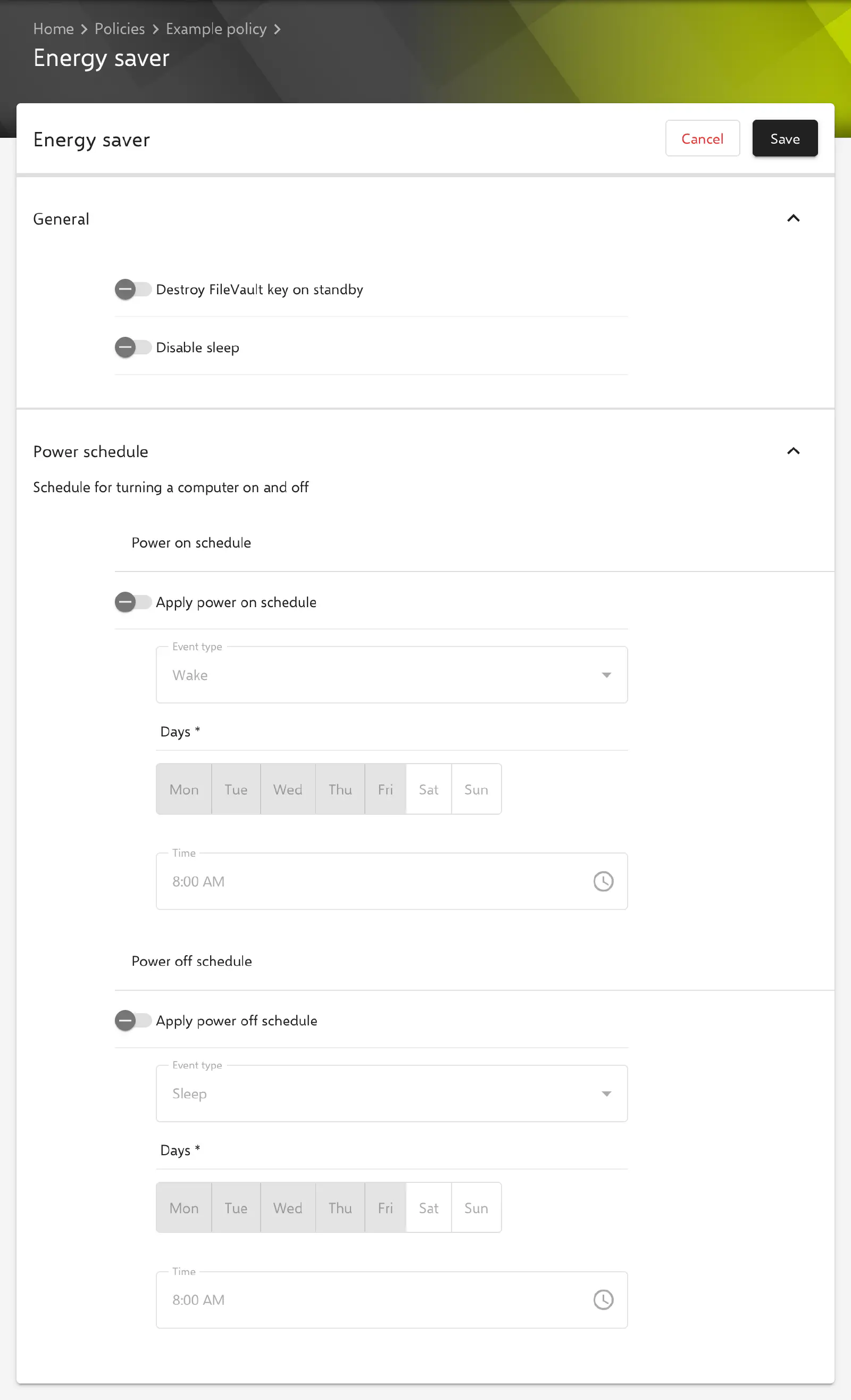
The first two switches in the General section apply to all Macs, regardless of model type. Both are disabled by default and are always transferred with their current value, that is, also as false. The key in the profile is given in parentheses.
- Destroy FileVault key on standby (
DestroyFVKeyOnStandby): macOS does not store a temporary FileVault key in the SMC or RAM for standby. According to Apple, the FileVault password must then be entered again when the Mac wakes from standby. - Disable sleep (
SleepDisabled): the Mac does not go to sleep.
Power schedule
The Power schedule section defines when the Mac regularly starts and when it goes to sleep, shuts down or restarts. Both schedules are disabled by default. Relution only transfers the schedules that are turned on (key com.apple.EnergySaver.desktop.Schedule); if none is turned on, the profile contains no schedule.
Under Power on schedule, Apply power on schedule activates a schedule for starting (RepeatingPowerOn). Under Power off schedule, Apply power off schedule activates a schedule for ending (RepeatingPowerOff). Each schedule consists of the following fields:
- Event type: what happens at the scheduled time.
- For starting, Wake (default) and Start up / Wake are available. Wake wakes a Mac from sleep, Start up / Wake additionally turns on a Mac that is switched off.
- For ending, Sleep (default), Shutdown and Restart are available.
- Days (required, default: Monday to Friday): weekdays on which the event occurs. Several days can be selected at once.
- Time (required, default:
08:00): time of the event in hours and minutes. The time on the Mac is decisive.
Exactly one schedule per direction is possible, that is, one time for all selected days. Different times on different weekdays cannot be stored. The schedule is transferred as a desktop schedule; whether and for which models macOS executes it is decided by macOS.
Desktop and laptop settings
The energy settings are stored separately by model type and power source. Each area has its own switch that activates it. Only activated areas are transferred; for the others, the Mac keeps its previous values. Which values macOS applies results from the model type of the Mac and the current power source.
| Card | Section | Switch | Key in the profile |
|---|---|---|---|
| Desktop settings | General | Apply desktop settings | com.apple.EnergySaver.desktop.ACPower |
| Laptop settings | When connected to power | Apply laptop AC settings | com.apple.EnergySaver.portable.ACPower |
| Laptop settings | When running on battery | Apply laptop battery settings | com.apple.EnergySaver.portable.BatteryPower |
All three switches are disabled by default. Once an area is activated, the same fields are available in each.
Fields per area
The following switches are disabled by default. In an activated area they are always transferred, so a disabled switch is explicitly transferred as off (0).
- Automatic restart on power loss (
Automatic Restart On Power Loss): the Mac restarts automatically after a power failure. - Dynamic power step (
Dynamic Power Step): adjusts processor performance dynamically to the load. According to the form, not available on all systems. - Reduce processor speed (
Reduce Processor Speed): lowers the processor speed. According to the form, not available on all systems. - Wake on LAN (
Wake on LAN): the Mac can be woken from sleep by a network packet. - Wake on Modem ring (
Wake On Modem Ring): the Mac wakes on an incoming call via a modem. The option only affects Macs with a modem.
The three sleep timers are each activated by their own switch. Only then can the value be entered and is it transferred; if the switch is disabled, the Mac keeps its previous setting. All values are given in minutes, permitted values are 0 to 180. The value 0 means never.
- Apply disk sleep timer with the field Disk sleep timer (
Disk Sleep Timer): time after which the disks are put to sleep. - Apply display sleep timer with the field Display sleep timer (
Display Sleep Timer): time after which the displays are turned off. - Apply system sleep timer with the field System sleep timer (
System Sleep Timer): time after which the Mac goes to sleep.
Special notes
- Sleep in the login window: the sleep button in the login window is not hidden here, but with the option Disable Sleep in the Login Window → configuration.
- Content caching: to keep a Mac acting as a caching server from going to sleep, the Content Caching → configuration provides its own option.
- Apple Configurator 2: If a policy already contains an Apple Configurator 2 configuration with the payload type
com.apple.MCX, the Energy saver and Accounts configurations can no longer be added to it. Conversely, the Energy saver configuration prevents an Apple Configurator 2 configuration with this payload type (see Apple Configurator 2 Configuration →). Energy saver and Accounts themselves can be used together in one policy.
Related topics
- Overview → — All configurations for macOS at a glance.
- FileVault → — Disk encryption to which the switch Destroy FileVault key on standby refers.
- Login Window → — Buttons for shutting down, restarting and sleep in the login window.
- Screen saver → — Screen saver and the idle time before it starts.
- Accounts → — Another configuration with the payload type
com.apple.MCX.