 Customer Hub
Kernel Extensions
KEXTs (Kernel Extensions) are modules that integrate deeply into the macOS operating system to extend its functionality or support specific hardware and system requirements. They operate at the kernel level — the “nervous system” of the operating system — and therefore provide access to resources and functions that are not directly accessible in user space.
Why are KEXTs needed?
- Support for non-native hardware such as specific graphics cards, network adapters, or external storage devices.
- Implementation of file systems (e.g., NTFS, FUSE) that are not available by default in macOS.
- Extension of network functionality, e.g., for VPN protocols or virtual network interfaces.
- Integration of security solutions and checks at the kernel level.
- Development of virtualization platforms and their interaction with the kernel.
Advantages of KEXTs
- Deep system access: They enable features that would otherwise not be possible without direct kernel access.
- Hardware compatibility: Devices and features not natively supported by macOS can be fully integrated through KEXTs.
- Flexible expandability: Developers can create custom solutions for specific requirements.
General
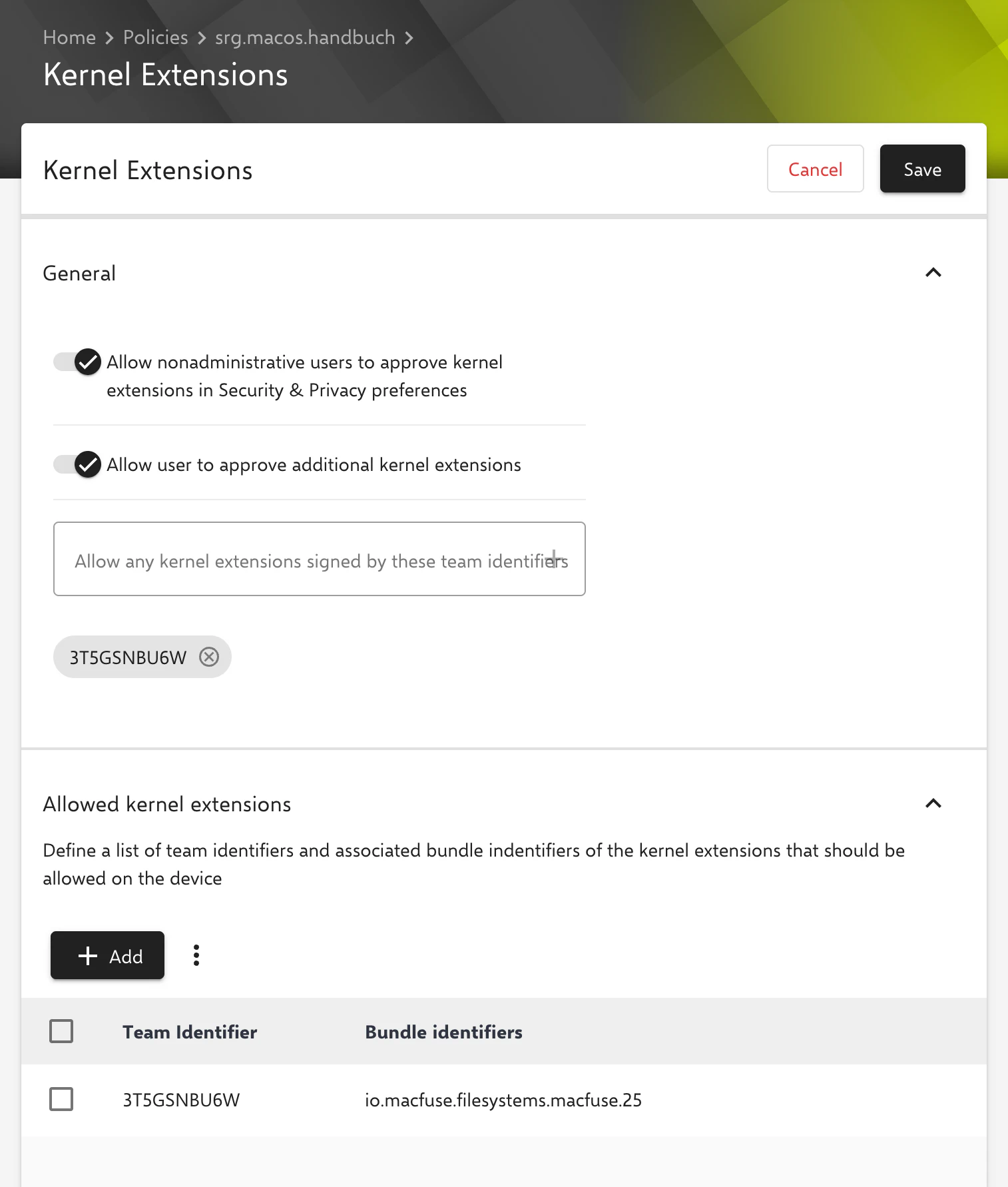
The Kernel Extensions configuration is added to a macOS policy under Devices → Policies via Add. Each policy can contain one configuration of this type. It is only available for devices enrolled via device enrollment, not for user enrollments.
The following configuration options are available in the General section:
- Allow nonadministrative users to approve kernel extensions in Security & Privacy preferences: toggle, off by default. When enabled, users without administrator privileges can also approve additional kernel extensions. Effective as of macOS 11.
- Allow user to approve additional kernel extensions: toggle, off by default. When enabled, users can approve kernel extensions that are not explicitly allowed by the configuration.
- Allow any kernel extensions signed by these team identifiers: list field for team identifiers. Validly signed kernel extensions with these team identifiers are allowed to load. If the list is left empty, no team identifier is transferred.
In general, all KEXTs with the same team identifier can be allowed. Alternatively, explicit extensions can be defined in the next section using a team identifier.
Allowed kernel extensions
Add opens the Add new Team identifier mapping dialog. The Team Identifier (required) is entered there, and the associated bundle IDs are listed under Bundle identifiers.
| Team Identifier | Bundle identifiers |
|---|---|
| 3T5GSNBU6W | io.macfuse.filesystems.macfuse.25 |
Reading Team Identifier and Bundle ID
The Team Identifier can be extracted from the downloaded macfuse-5.1.1.dmg using the following command:
codesign -d --verbose=2 macfuse-5.1.1.dmg 2>&1 | grep -i teamidentifier
Output:
TeamIdentifier=3T5GSNBU6W
The Bundle ID can be obtained from a manually installed KEXT (example: macFUSE) as follows:
kextstat | grep -i fuse
Output:
Executing: /usr/bin/kmutil showloaded
No variant specified, falling back to release
  265    0 0                  0x1830     0x1830     io.macfuse.filesystems.macfuse.25 (5.1.1) 67A4F7E1-82FE-30A4-A3B3-B6E8722C287A <9 7 6 5 3>
Thus, io.macfuse.filesystems.macfuse.25 is the required Bundle ID.
Note
Under Allowed kernel extensions, multiple bundle IDs can be assigned to one team identifier — either when creating a new entry via Add or when editing an existing entry via the three-dot menu and Edit.
Each team identifier can only be added once. A second entry with the same team identifier is rejected with the message Team identifier already exists; additional bundle IDs are therefore added to the existing entry.