 Customer Hub
Proxies
The Proxies configuration defines the proxy settings of a Mac. A separate proxy server can be stored and enabled individually for each supported protocol; alternatively, the proxy is determined automatically via a PAC file (Proxy Auto-Config). In addition, an exception list for hosts and domains as well as options for passive FTP and cellular fallback are available. Relution transfers the settings as a profile with the payload type com.apple.SystemConfiguration.
Prerequisites
- The configuration is only available in macOS policies.
- The device is enrolled via Device Enrollment. The configuration is not available for devices with User Enrollment →.
- Relution does not require the device to be supervised.
The configuration can only be added once per policy.
Configuration
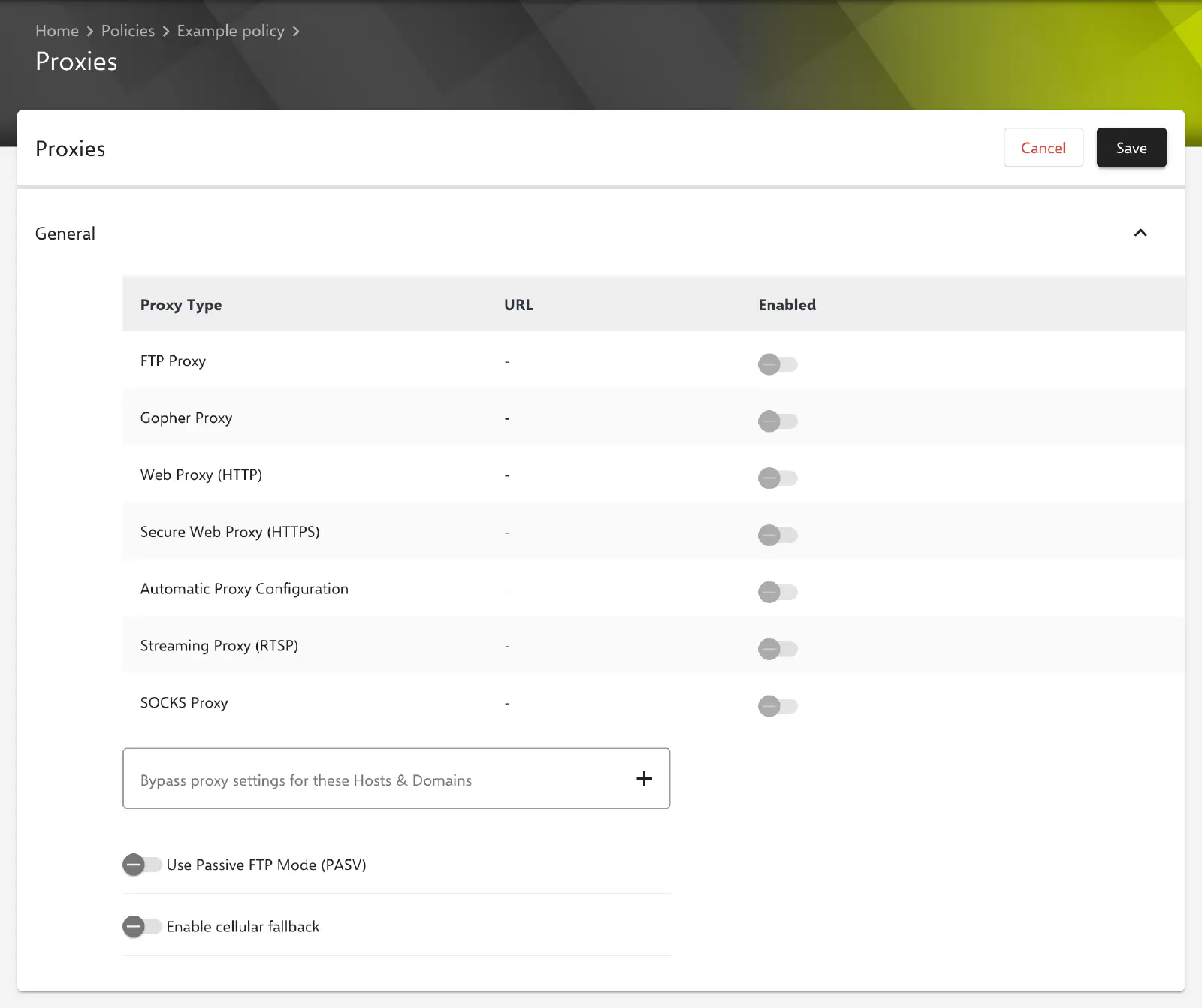
Under Devices → Policies, the Proxies configuration is added to a macOS policy via Add. The General section contains a table with all proxy types, followed by the exception list and two switches.
Proxy types
Each row of the table shows one proxy type with the columns Proxy Type, URL (proxy server and port in the format server:port, - if not specified) and Enabled. All seven types are predefined; rows can neither be added nor removed.
| Proxy Type | Use |
|---|---|
| FTP Proxy | Proxy for FTP connections. |
| Gopher Proxy | Proxy for the Gopher protocol. |
| Web Proxy (HTTP) | Proxy for unencrypted web access via HTTP. |
| Secure Web Proxy (HTTPS) | Proxy for encrypted web access via HTTPS. |
| Automatic Proxy Configuration | URL of a PAC file from which the device determines the proxy. No port is specified here. |
| Streaming Proxy (RTSP) | Proxy for streaming connections via RTSP. |
| SOCKS Proxy | SOCKS proxy for general TCP connections. |
In a new configuration, all proxy types are empty and disabled.
Editing a proxy
Edit in the context menu of a row opens a dialog with the name of the proxy type as its title. Confirm applies the entries to the table; the configuration itself is only saved via Save in the form.
| Field | Description |
|---|---|
| Proxy Server | Host name or IP address of the proxy server; for the Automatic Proxy Configuration type, the URL of the PAC file. |
| Port | Optional. Port of the proxy server. The field is not shown for the Automatic Proxy Configuration type. The server accepts values from 1 to 65535. |
The switch in the Enabled column can only be used once a Proxy Server has been entered. Otherwise, the tooltip shows “Proxy information is incomplete. Proxy server URL is missing.”. If the Proxy Server of an enabled type is cleared later, the portal disables the type automatically. Several proxy types can be enabled at the same time.
Further settings
The following settings are available below the table:
| Field | Description |
|---|---|
| Bypass proxy settings for these Hosts & Domains | List of hosts and domains for which no proxy servers are used. An entry is added with the Enter key, via the plus icon or when leaving the field; duplicate entries are ignored. Empty by default. |
| Use Passive FTP Mode (PASV) | Uses passive mode for FTP connections. Disabled by default. |
| Enable cellular fallback | Transfers the cellular fallback option (FallBackAllowed) to the device. Disabled in the portal for a new configuration. |
Special notes
- Validation on save: For each enabled proxy type, the server rejects the configuration if no Proxy Server is specified or if a specified Port is outside the range
1to65535. Disabled types are not validated. - No credentials: The configuration contains no fields for a user name or password to authenticate with the proxy server. For a proxy with authentication, the Global HTTP Proxy → configuration is available on supervised devices.
- No placeholders or certificates: The form offers no placeholder selection and no certificate references.
Differences from Global HTTP Proxy
The Global HTTP Proxy → configuration is also available in macOS policies, but differs in the following points:
| Proxies | Global HTTP Proxy | |
|---|---|---|
| Platforms | macOS only | iOS, iPadOS and macOS |
| Supervision | not required | required |
| Proxy server | a separate server per protocol (HTTP, HTTPS, SOCKS, FTP, RTSP, Gopher) | one proxy for HTTP traffic |
| PAC file | yes | yes |
| Exception list for hosts and domains | yes | no |
| Proxy authentication | no | user name and password |
| Payload type | com.apple.SystemConfiguration | com.apple.proxy.http.global |
Behavior on the device
The following behavior is determined by Apple, not by Relution; this information is provided without guarantee:
- Which applications and services take the proxy settings into account is decided by macOS or the respective application.
- The proxy servers or the PAC file must be reachable from the Mac. The proxy must also allow access to the Relution server and Apple services so that the device can continue to retrieve commands and configuration changes. Internal hosts can be excluded from the proxy via the exception list for this purpose.