 Customer Hub
Script
With the Script configuration, a shell script stored under Scripts is run regularly on managed Macs, on defined weekdays at a fixed time. The script is executed by the macOS Companion → (the Relution Daemon service on the Mac), not by the MDM profile. For a one-time execution, the Execute shell script action is available instead (see Available actions →).
Prerequisites
- Enable macOS companion is turned on under
Settings→Relution Client Apps(default: enabled). Otherwise, the configuration is not offered in the selection dialog. - The macOS Companion is only deployed on Macs running macOS 12 or later.
- The configuration is only available for devices with device enrollment, not for devices with User Enrollment →.
- The script to be run is created under
Scriptsas a shell script for macOS. - A supervised device is not required.
- The configuration can be added to a policy multiple times, each with one script. In the configuration list of the policy, it appears under the name of the selected script.
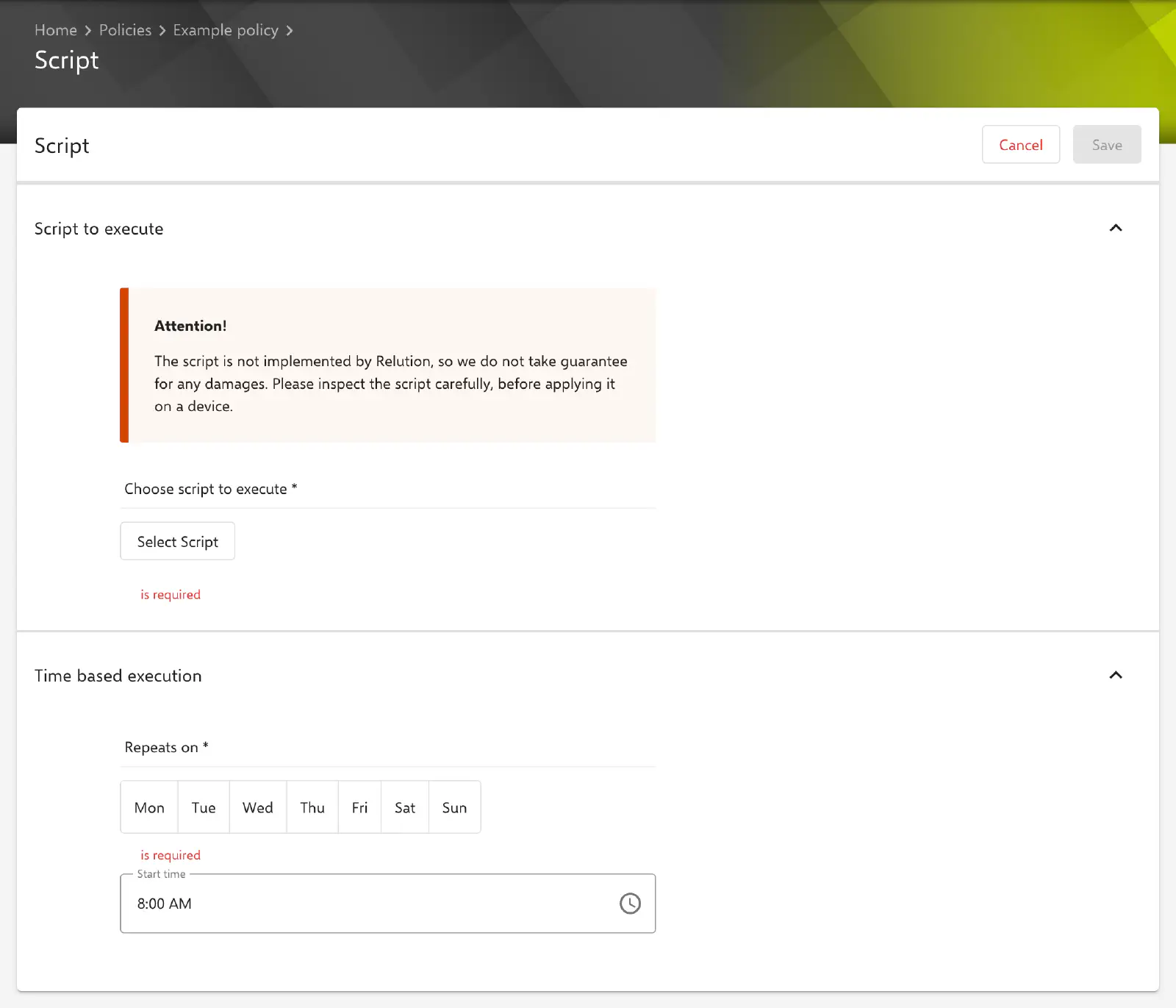
Script to execute
In the Script to execute section, exactly one script is selected under Choose script to execute via the Select Script button (required). The selection list only shows shell scripts for macOS. Besides the scripts of the own organization, it contains scripts that have been shared across organizations in the global organization or in a meta organization. The selected script appears as an entry below the button and can be removed again via its cross icon.
When a saved configuration is opened, the form loads the current state of the script. If the script no longer exists, the selection is empty and has to be set again before the configuration can be saved.
Time based execution
The Time based execution section defines the schedule. Both fields are required.
- Repeats on (default: no day selected): weekdays on which the script is run. Several days from Monday to Sunday can be selected at once; at least one day is required.
- Start time (default:
08:00): time of execution on the selected days, stored in the formatHH:mm.
A time zone cannot be selected: Relution always stores the start time with the time zone Europe/Paris (CET/CEST).
Special notes
- Time based execution only: Unlike the Windows Script Configuration →, macOS offers no event based execution (device start, logon, logoff), no choice of time zone and no options to limit the execution.
- Changes to the script: If a script is changed under
Scripts, Relution automatically distributes the new version via the Companion to all active devices that are assigned a published policy with this script. The policy does not have to be published again for this. - Deleting a script: A script that is used in a published policy cannot be deleted.
- Execution results: The executions of a script are listed under
Scriptsfor the respective script in the History area. The Execution type Configuration marks executions from a policy, Action the manually started ones. - Companion disabled: If Enable macOS companion is turned off, the macOS Companion is uninstalled from all enrolled Macs. Scheduled scripts are then no longer run.
Related topics
- Overview → — All configurations for macOS at a glance.
- Companion & Daemon → — Deployment and prerequisites of the macOS Companion.
- Available actions → — One-time execution via the Execute shell script action.
- Windows Script Configuration → — PowerShell scripts on Windows devices with event based and time based execution.