 Customer Hub
System Extensions
The System Extensions configuration defines which system extensions may load on managed Macs without user confirmation, which types of extensions a vendor may install and which extensions are protected against being disabled or removed. Relution transfers the settings as a profile with the payload type com.apple.system-extension-policy.
Unlike kernel extensions (KEXTs), system extensions run outside the kernel and, according to Apple, have been gradually replacing them since macOS 10.15. Typical examples are VPN clients, content filters, virus scanners and drivers for peripherals. For extensions that are still shipped as a KEXT, the Kernel Extensions → configuration applies.
Prerequisites
- The configuration can be added once per policy.
- It is only available for devices with device enrollment, not for devices with User Enrollment →.
- The configuration targets Macs running macOS 10.15 and later. macOS only evaluates some options in newer versions (see the respective sections).
- A supervised device is not required.
General
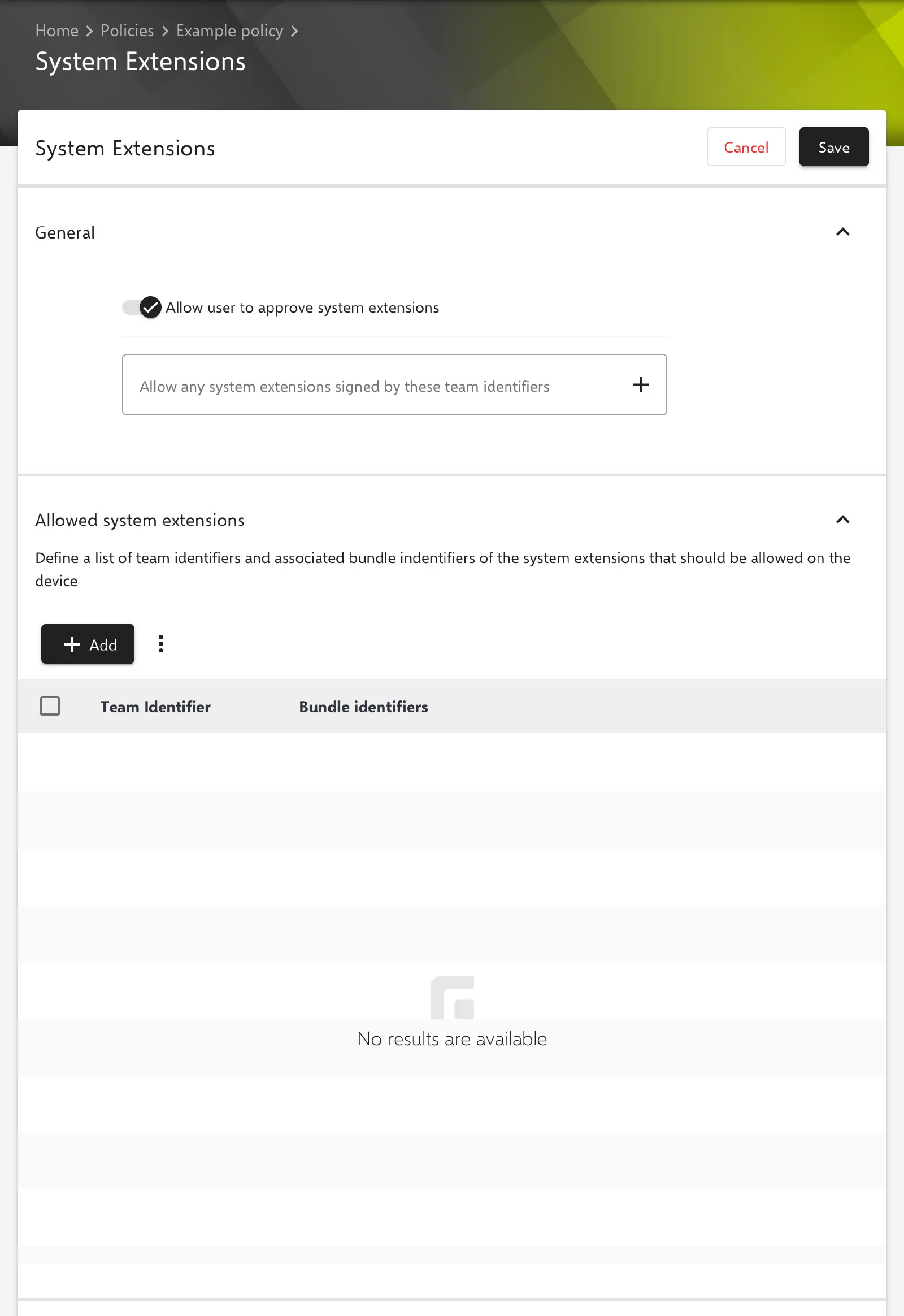
The following options are available in the General section. The key in the profile is shown in parentheses.
- Allow user to approve system extensions (
AllowUserOverrides, default: enabled): If the option is enabled, the user can additionally approve system extensions that are not explicitly allowed by the configuration. If it is disabled, the user cannot approve system extensions that are not allowed by a configuration profile. The value is always transferred. - Allow any system extensions signed by these team identifiers (
AllowedTeamIdentifiers): list of team identifiers. All validly signed system extensions of these vendors are allowed without further details.
A team identifier may appear either under Allow any system extensions signed by these team identifiers or in the Allowed system extensions section, not in both. Otherwise the message The same team identifier cannot be defined in the allowed team identifiers and allowed system extensions. appears and the configuration cannot be saved.
Lists with team identifier and bundle identifiers
The sections Allowed system extensions, System extensions that cannot be removed from the UI, System extensions that cannot be removed and System extensions that can be removed share the same structure. Each entry maps a Team Identifier to a list of Bundle identifiers.
Add opens the dialog Add new Team identifier mapping with the following fields:
- Team Identifier (required): team identifier of the vendor the extension is signed with, e.g.
ABCDE12345. - Bundle identifiers: list of bundle IDs of this vendor’s system extensions, e.g.
com.example.app.network-extension.
The context menu of an entry offers Edit and Delete. Each team identifier can only be added once per section; a second entry is rejected with the message Team identifier already exists. Additional bundle IDs are therefore added to the existing entry. If a section remains empty, the corresponding key is not transferred.
Allowed system extensions
Key AllowedSystemExtensions. Individual system extensions of a vendor are allowed by team identifier and bundle ID. This variant is narrower than allowing the whole team identifier in the General section.
System extensions that cannot be removed from the UI
Key NonRemovableFromUISystemExtensions. According to Apple, the listed system extensions cannot be disabled or uninstalled from System Settings or the Finder. According to Apple, macOS evaluates the key as of macOS 15.
System extensions that cannot be removed
Key NonRemovableSystemExtensions. According to Apple, the listed system extensions cannot be disabled or uninstalled while System Integrity Protection (SIP) is enabled. According to Apple, macOS evaluates the key as of macOS 15.
System extensions that can be removed
Key RemovableSystemExtensions. The listed system extensions may remove themselves: an app can deactivate them via the OSSystemExtensionDeactivationRequest interface without an administrator confirming the operation. macOS evaluates the key as of macOS 12.
Conflicting entries
The same entry (same Team Identifier with the same Bundle identifiers) must not appear in two of the following sections at the same time. In this case Relution shows a message and does not save the configuration:
- System extensions that cannot be removed and System extensions that can be removed: message The same team and bundle identifier cannot be defined in the removable system extensions and non-removable system extensions.
- System extensions that cannot be removed and System extensions that cannot be removed from the UI: message The same team and bundle identifier cannot be defined in the non-removable from the UI system extensions and non-removable system extensions.
Allowed system extension types
Key AllowedSystemExtensionTypes. This section defines per team identifier which types of system extensions the vendor may install. Add opens a dialog with the following fields:
- Team Identifier (required): team identifier of the vendor.
- Allowed extension types (required, multiple selection):
- Driver (
DriverExtension): driver extensions for hardware, e.g. based on DriverKit. - Network (
NetworkExtension): network extensions, e.g. for VPN clients or content filters. - Endpoint Security (
EndpointSecurityExtension): extensions for security software, e.g. virus scanners.
- Driver (
Here, too, each team identifier can only be added once. If the section remains empty, the key is not transferred and Relution does not restrict the extension types.
Reading the team identifier and bundle ID
On a Mac on which the extension is already installed, the command systemextensionsctl list in Terminal lists all system extensions with team identifier and bundle ID:
systemextensionsctl list
For each extension, the output shows the team identifier in the teamID column and the bundle ID in the bundleID column. Many vendors also state both values in their documentation for MDM solutions.
Special notes
- Relution Decon: If a Relution Decon → configuration is active on a Mac, Relution adds the team identifier
6YCL5AN4F4toAllowedTeamIdentifiersduring transfer so that the Decon network extension can load. If none of the device’s policies contains a System Extensions configuration, Relution generates one with this team identifier; Allow user to approve system extensions is disabled in it. - Apple Configurator 2: If a policy already contains an Apple Configurator 2 configuration with the payload type
com.apple.system-extension-policy, the System Extensions configuration can no longer be added to it, and vice versa (see Apple Configurator 2 Configuration →). - Vendor behavior: How macOS merges several profiles with this payload type and when an already loaded extension is re-evaluated is decided by Apple.
Related topics
- Kernel Extensions → — Approval of kernel extensions (KEXTs) that are not available as a system extension.
- Relution Decon (content filter) → — Content filter whose system extension Relution approves automatically.
- Overview → — All configurations for macOS at a glance.
- Apple Configurator 2 Configuration → — Custom profiles with payloads that Relution does not offer as a form.