 Customer Hub
Time Machine
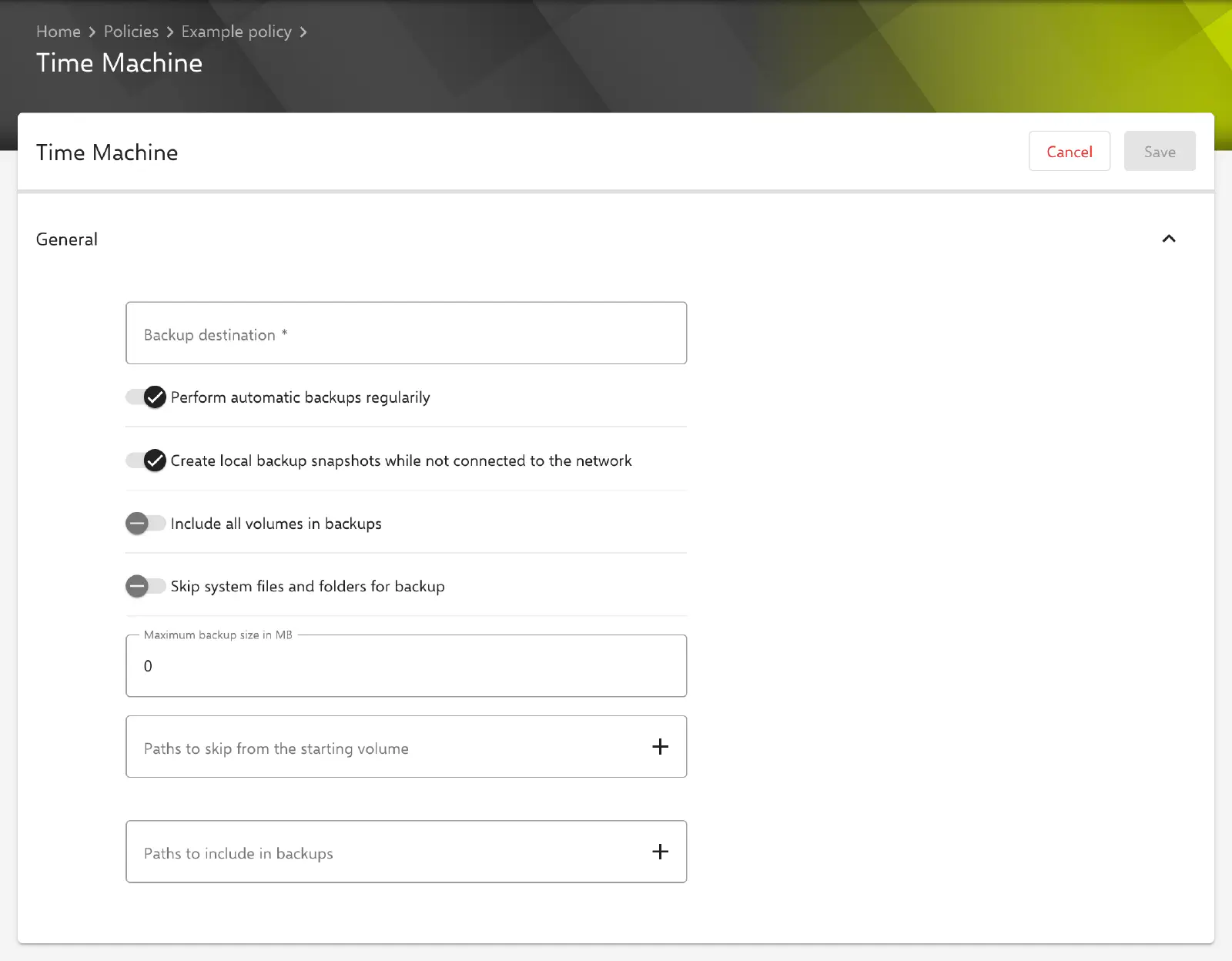
With the Time Machine configuration, the settings of the backup feature built into macOS are defined on managed Macs: the backup destination, whether backups run automatically, which volumes and paths are included or skipped, and the maximum size of the backup. Relution transfers the settings as a profile with the payload type com.apple.MCX.TimeMachine.
Prerequisites
- The configuration can be added once per policy.
- It is only available for devices with device enrollment, not for devices with User Enrollment →.
- Relution lists the configuration for macOS 10.7 and later. A supervised device is not required.
- The backup destination must be reachable from the Mac. The configuration neither sets up the share nor contains fields for credentials.
General
The General section provides the following fields and options. The key in the profile is given in brackets.
- Backup destination (
BackupDestURL, required): URL of the location where Time Machine stores the backups, for example a network share in the formsmb://server.example.com/backups. As long as the field is empty, the configuration cannot be saved. - Perform automatic backups regularily (
AutoBackup, default: enabled): Time Machine backs up automatically at regular intervals. - Create local backup snapshots while not connected to the network (
MobileBackups, default: enabled): if the backup destination is not reachable, the Mac creates local snapshots. - Include all volumes in backups (
BackupAllVolumes, default: disabled): all volumes are backed up. If the option is turned off, only the startup volume is backed up. - Skip system files and folders for backup (
BackupSkipSys, default: disabled): system files and folders are not backed up. - Maximum backup size in MB (
BackupSizeMB, default:0): upper limit for the size of the backup in megabytes as a whole number. The value0stands for an unlimited size.
All values are always transferred, even if they match the default.
Paths
At the end of the form there are two lists that adjust the scope of the backup. Both are empty by default and are then transferred as an empty list.
- Paths to skip from the starting volume (
SkipPaths): paths on the startup volume that are not backed up, e.g./Users/Shared/Temp. - Paths to include in backups (
BasePaths): paths that are backed up in addition to the startup volume, e.g./Volumes/Data.
Both lists work the same way:
- An entry is added with the Enter key, via the plus icon or when the field loses focus, and then appears as an element below the field.
- Several values separated by spaces are added in one step as individual entries. A path that itself contains spaces is therefore enclosed in double quotes, e.g.
"/Users/Shared/Old Projects". The quotes are removed when the entry is added. - Duplicate entries are ignored.
- A click on an element moves the entry back into the input field for editing; the cross removes it.
Special notes
- Locking user changes: Whether users may change the Time Machine settings in System Settings themselves is not defined by this configuration, but by the option Allow modification of Time Machine setting in the Restrictions → configuration (macOS 14 and later).
- No placeholders: The backup destination and the paths are transferred unchanged; placeholders such as
${user.name}are not replaced. - Vendor behavior: Which of the keys a particular macOS version still evaluates is decided by macOS. Relution transfers the values regardless of the device’s version.
- Apple Configurator 2: If a policy already contains an Apple Configurator 2 configuration with the payload type
com.apple.MCX.TimeMachine, the Time Machine configuration can no longer be added to it, and vice versa (see Apple Configurator 2 Configuration →).
Related topics
- Overview → — All configurations for macOS at a glance.
- Restrictions → — Preventing users from changing the Time Machine settings.
- FileVault → — Encryption of the startup volume.
- Apple Configurator 2 Configuration → — Custom profiles with payloads that Relution does not offer as a form.