 Customer Hub
WiFi
The WiFi configuration transfers the credentials of a Wi-Fi network to Apple TVs so that the devices connect without manual input. The form is a reduced version of the WiFi configuration for iOS, macOS, watchOS and visionOS →. Shared fields are described there in detail; this article lists the fields for tvOS and the differences.
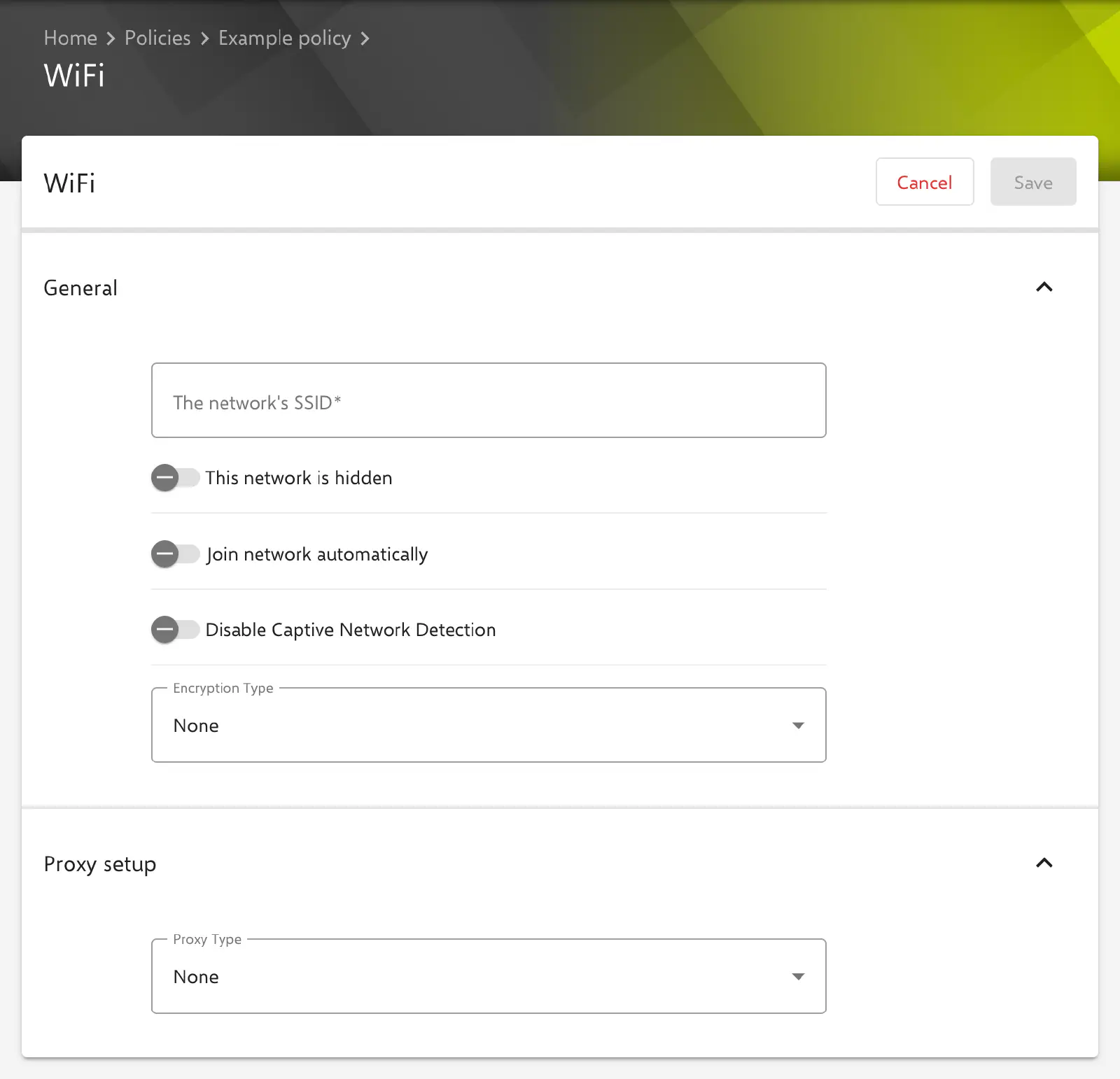
Adding the configuration
The configuration is created in the Relution portal via Devices → Policies → {tvOS policy} → Add → WiFi → Add details. Configurations can only be added to a draft version of the policy. WiFi is available in tvOS policies and can be added several times per policy, e.g. for different networks.
The portal does not specify a minimum tvOS version or a supervised device as a requirement for the configuration.
General
- The network’s SSID: Name of the network. Required field. The SSID also appears as the name of the configuration in the policy.
- This network is hidden: for networks that do not broadcast their SSID. Disabled by default.
- Join network automatically: The Apple TV connects on its own as soon as the network is in range. In a new tvOS configuration the switch is off (unlike iOS) and is turned on for automatic joining.
- Disable Captive Network Detection: When connecting, the device does not check whether a login page (captive portal) is in front of the network and does not show the captive network assistant. Disabled by default.
- Encryption Type: None (default), WEP, Personal WPA/WPA2, Personal WPA2, Personal WPA3, Personal Any, Dynamic WEP, Enterprise WPA/WPA2, Enterprise WPA2, Enterprise WPA3 or Enterprise Any. The meaning of the types is described under Encryption →.
- Password: Network key for the personal encryption types. Optional; if the field is left empty, no key is transferred.
With the enterprise encryption types, the EAP settings and the Quality of Service Policy section appear.
Enterprise authentication (EAP)
The EAP settings correspond to those of the iOS configuration: Accepted EAP Types, Username, One time user password, Password, Identity Certificate (from certificate management, as a certificate template or as a user-defined certificate), Inner authentication, Outer identity, Enable 2 factor authentication, TLS minimum version, TLS maximum version and the trust settings Allow trust exceptions, Trusted Server Names and Trusted Certificates. Meaning and dependencies of the fields: Enterprise authentication (EAP) →
The only difference: EAP-SIM can be selected as an EAP type, but the Number of SIM RANDs field is omitted and Relution does not transfer a value for it.
Proxy and Quality of Service
The Proxy setup section is identical to the iOS configuration (None, Automatic with a PAC file, Manual with server, port and optional authentication), see Proxy setup →.
The Quality of Service Policy section with Enable QoS marking, Allow audio and video calls and Allowed apps appears in tvOS only for the enterprise encryption types. The fields are described under Quality of Service policy →.
Differences from the iOS configuration
The tvOS form does not offer the following fields of the iOS configuration:
| Field (iOS) | Behavior in tvOS |
|---|---|
| Disable MAC address randomization (private address) | not transferred |
| Enable IPv6 | no switch; IPv6 is always transferred as enabled for the network |
| Wi-Fi Hotspot 2.0 HESSID | not transferred |
| Setup mode (macOS only) | not applicable |
| Number of SIM RANDs | not transferred |
In addition, Join network automatically is off in a new configuration, and the Quality of Service Policy is only available for enterprise encryption types.
Special notes
- Multiple WiFi configurations: If an Apple TV receives several WiFi configurations with the same The network’s SSID, only one of them is applied.
- Stored passwords: Since Relution 26.5.5, stored passwords (Wi-Fi password, EAP password, proxy password) are no longer displayed in the form; the field then shows
*****. If it is left unchanged, the stored password is kept. - Placeholders: User placeholders such as
${user.name}or${user.email}can be used in the text fields and are resolved per device. The form shows the available placeholders below the settings. More information: Advanced placeholders → - Return to Service: The Return to Service action for Apple TV requires a tvOS WiFi configuration from a published version of an active policy, see Available actions →.
Related topics
- WiFi (iOS, macOS, watchOS, visionOS) →
- Certificate management →
- Built-In CA →
- Advanced placeholders →
- Available actions →
- Configuration overview →