Network-based Policy Assignment (BYOD)
Introduction
In BYOD scenarios, devices are used both inside and outside of school.
A purely time-based policy assignment is often inflexible and comes with a high administrative overhead.
A proven alternative is network-based policy assignment, where policies are automatically applied as soon as a device is connected to the school network.
Detection is based on the public IP address of the network.
This approach is particularly well suited for BYOD environments, as devices are not unnecessarily restricted outside of school while administrative effort is reduced.
Basic principle
The location of a BYOD device is determined indirectly via its public IP address.
The setup consists of:
- One policy that should only apply within the school network
- One dynamic device group that collects devices based on their public IP address
As soon as a device connects to the school Wi-Fi and reports its IP address to Relution, it is automatically assigned to the dynamic device group and receives the corresponding policy.
Important:
The device must remain connected to the school Wi-Fi for the configuration to be applied and maintained.
Recommended BYOD base group
Regardless of school-specific restrictions, BYOD devices should always be assigned to a base device group.
This group contains configurations that apply permanently, such as:
- School Wi-Fi profiles
- Required apps
- Basic restrictions that also apply outside of school
This ensures that devices remain functional at all times.
Configuring the dynamic device group
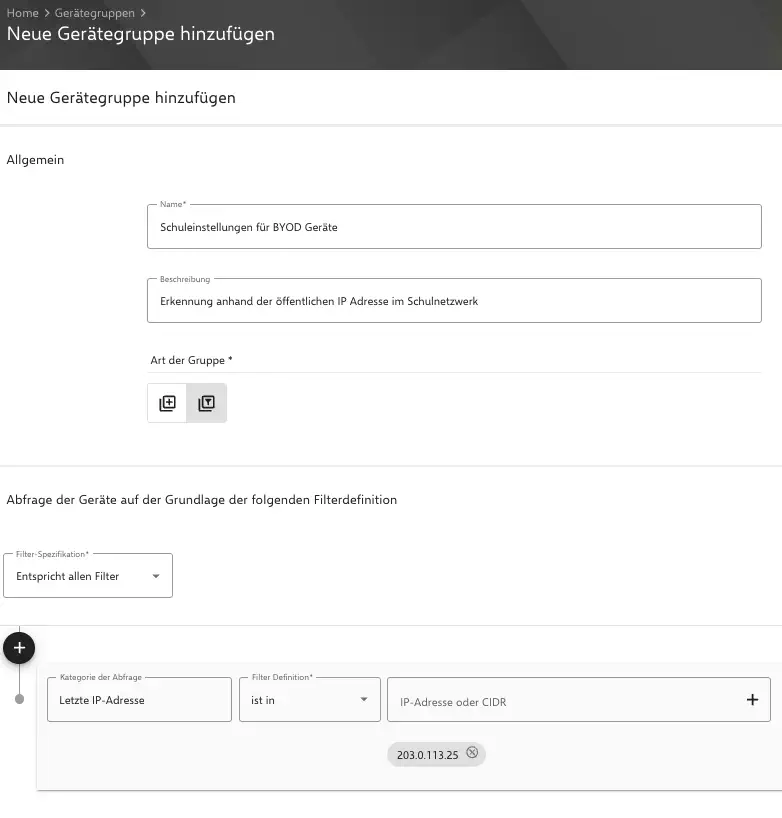
Create a new dynamic device group and configure a filter based on the device’s public IP address.
The filter must cover the public IP range of the school network.
All devices that report a matching IP address are automatically added to the group.
Updating the IP address
The public IP address is only transmitted to Relution when the “Update device details” action is executed.
This happens in the following cases:
- When policies are executed
- Once per day
- Via a device group action with a cron-based trigger
- When the user manually triggers the action in the Relution Agent via the Settings tab
Recommendation: Cron-based trigger
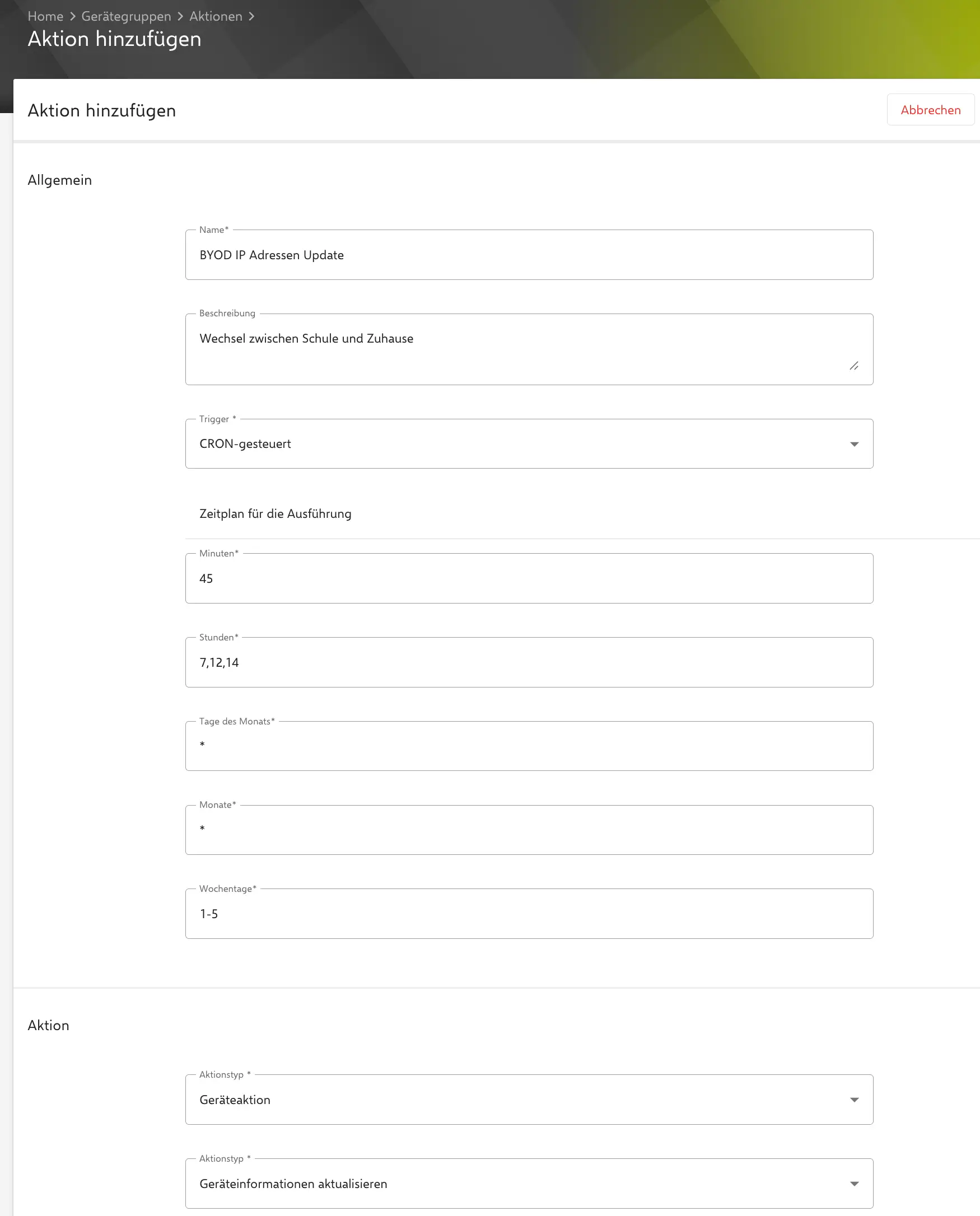
In most BYOD environments, we recommend using a cron-based trigger in the dynamic device group. This cron job should be attached to the group in which the device permanently resides, not to the “School Settings” group. This ensures that devices regularly update their IP address without requiring user interaction.
Notes on using cron jobs
- Do not use very short intervals
- Avoid high execution frequencies
For example, triggering an “Update device details” action every hour for a large number of devices can lead to significant performance issues.
A moderate interval is sufficient and ensures stable operation.
In the following example configuration, the action is executed on all weekdays at 7:45, 12:45, and 14:45.
Advantages of network-based assignment (BYOD)
- No complex schedules required
- Policies only apply within the school network
- Fewer policies compared to time-based approaches
- Ideal for privately owned devices
Limitations and notes
- Devices must be connected to the school network
- The method depends on stable public IP ranges
- Changes may only take effect after the next device details update
Summary
Network-based policy assignment using the public IP address is a low-maintenance and reliable solution for BYOD environments.
It allows school-specific policies to be applied only when devices are actually connected to the school network, while remaining unrestricted outside of it.