 Customer Hub
SchulConnex Import
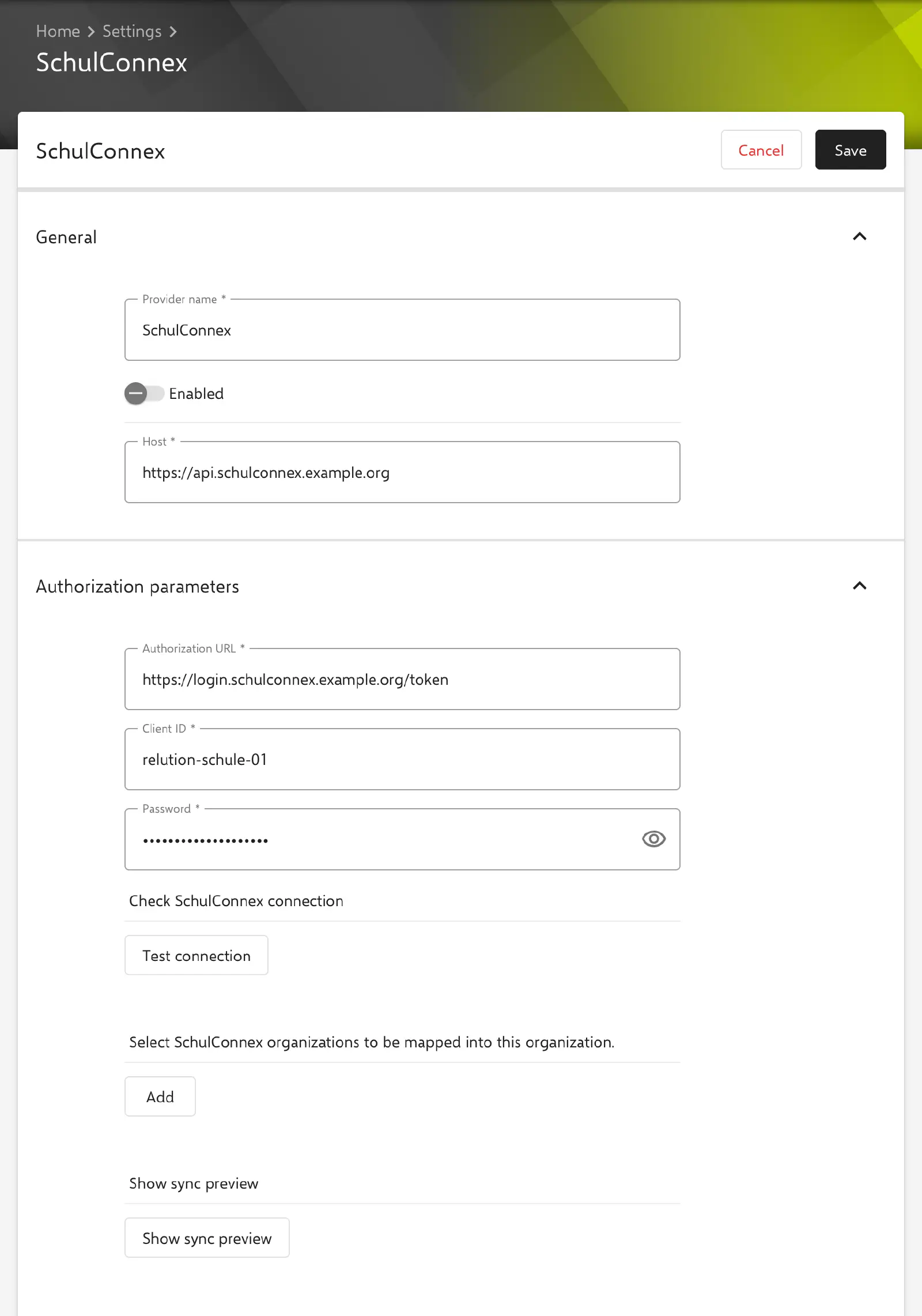
Relution supports synchronizing identities and educational context data via SchulConnex (a German school data exchange standard). The feature can be found under Settings → User Management → SchulConnex and automatically synchronizes users, group roles and classes/courses from the underlying school administration software. In the SchulConnex Imports overview, a new configuration is created via Add.
SchulConnex is used for import only. Imported users sign in to Relution via a different login method, e.g. an identity provider.
General
- Provider name: Unique name for the configuration. The name must not be used by any other provider configuration and cannot be changed after saving.
- Enabled: Turns synchronization on. For a new configuration, the switch is turned off; as long as it is disabled, no synchronization takes place.
- Host: URL of the SchulConnex server.
Authorization Parameters
- Authorization URL: URL used for OAuth authentication.
- Client ID: Client ID for authentication.
- Password: Client secret of the SchulConnex client. For a saved configuration, the field shows
*****; if it is left empty, the stored secret remains in effect. If Host or Authorization URL is changed, the secret must be entered again, otherwise Relution rejects saving, the connection test and the sync preview.
The connection can be tested via the Test connection button (label Check SchulConnex connection) as soon as all required fields are filled in correctly.
Organization Mapping
- On a regular organization, the SchulConnex organizations to be incorporated are selected directly (1:1 mapping).
- On the global organization or a meta organization, multiple Relution organizations can be managed at once: for each Relution organization, a dedicated set of SchulConnex organizations is assigned via a mapping wizard. Each SchulConnex organization and each Relution organization can only be mapped once.
Show sync preview shows upfront which classes/courses would be imported, along with their teacher and student counts.
Synchronization Settings
- Synchronize classes: Enables the import of classes/courses (enabled by default).
- Action, when a user is removed in SchulConnex: Defines what happens when a previously synchronized user no longer exists in SchulConnex:
None(default),DeactivateorDelete. - Action, when a class is removed in SchulConnex: Defines what happens to classes removed in SchulConnex:
None(default) orDelete. - Automatic Synchronization: Schedule via cron syntax (minutes, hours, days of month, months, days of week). By default, synchronization runs twice daily at 5 AM and 8 PM.
In addition to automatic synchronization, a sync run can be triggered manually at any time via the Sync icon in the header of the configuration’s detail view (requires the permission to update users or classes).
Role Mapping
SchulConnex group roles are automatically mapped to the organization’s system groups <ORGANIZATION> Teacher and <ORGANIZATION> Student on import:
- Teachers: Roles
LEHR,KLLEIT,FOERD,VLEHR,GLEIT - Students: Roles
LERN,GMIT
Only SchulConnex groups of type class or course are evaluated. The role SCHB is not assigned to any group. In addition, all imported users are assigned to a group of the provider.
Checking Synchronization
After a sync run, the results can be reviewed in the configuration’s detail view. For users and classes separately, it shows the next planned synchronization, the time of the last completion, whether the synchronization was successful, the Status message and the number of synced, missing and failed objects. Clicking the number under Sync Errors shows the individual errors.
Other errors, such as a timeout, only abort the synchronization of the affected mapped organization. For this organization, the actions for removed users and classes are not executed; the remaining organizations are fully synchronized. In this case, the sync run is reported as failed.