 Customer Hub
Migrate MSSQL to MariaDB
With Relution 5.25 the support for Microsoft SQL Server will finally be discontinued. The following instructions (valid from Relution version 5.24.2/ 5.25.0) describe how to migrate using the HeidiSQL GUI. If support is needed, please contact the Relution Helpdesk Team.
Migration
shut down Relution
1.1 Create new database and configure my.cnf cnf template →
1.2 Create new database with HeidiSQLconnect old and new database in HeidiSQL
create schema in the new database
In the application.yml update the following values
4.1 Changedatabase typetomariadb
4.2 Customize JDBC connection string- jdbc:mariadb://<db_server>:<db_port>/<db_name>?useServerPrepStmts=true4.3 Update DB username and password
Start Relution against the new DB with foreground.bat with + parameter
/relution/windows-bin/foreground.bat --database-migration-onlyExit Relution
right-click on the old database
database export
databasechangelog + DatabaseChangeLockLock Table + deselect all views + JGROUPSPing
max INSERT length to 10k
deselect all databases and tables
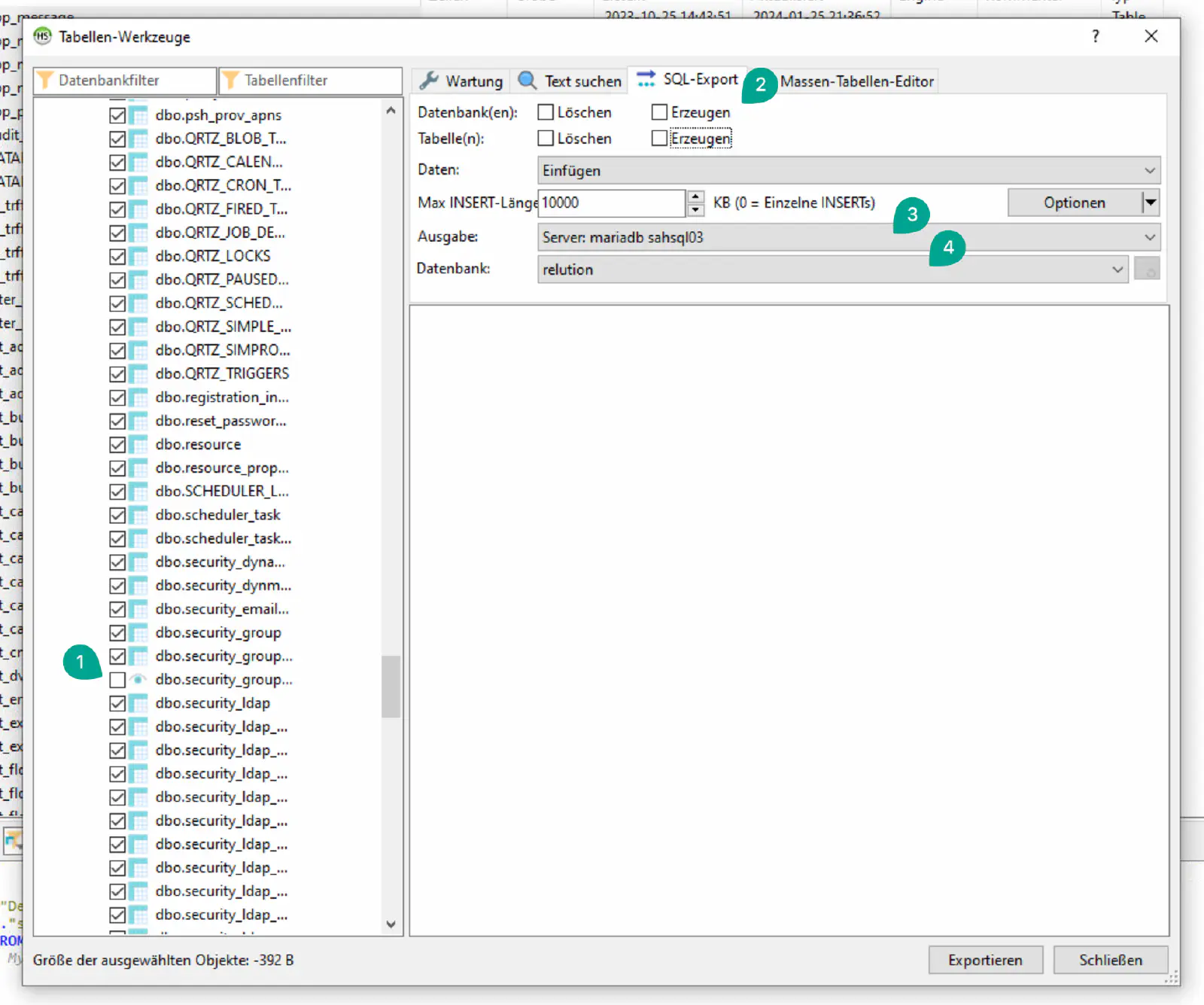
output: New database Server
database: New database
start migration
After the migration
- start Relution
- check Relution log if the start works correctly
- log in to Relution and check whether resources can be loaded
- open Device Inventory (check whether the database views open)