 Customer Hub
nginx: Multiple certification paths
Certificate authorities have new root certificates additionally signed by older, widely distributed root certificates (cross-signing). As a result, there are several certification paths for a server certificate: clients whose trust store already contains the new root certificate use the short path; older clients, e.g. older Android versions or Java runtime environments, use a path via an older root certificate.
nginx delivers exactly one certificate file per key. Multiple paths are created by having this file (server.pem) contain all intermediate certificates required for the desired paths. Each client then picks the path that matches its trust store.
This guide assumes that the server certificate and key have been prepared as described in Renew a purchased certificate →. It extends the server.pem created there with additional intermediate certificates.
Example: Sectigo with three paths
The following SSL Labs → result shows a server with a Sectigo certificate for which three certification paths exist:
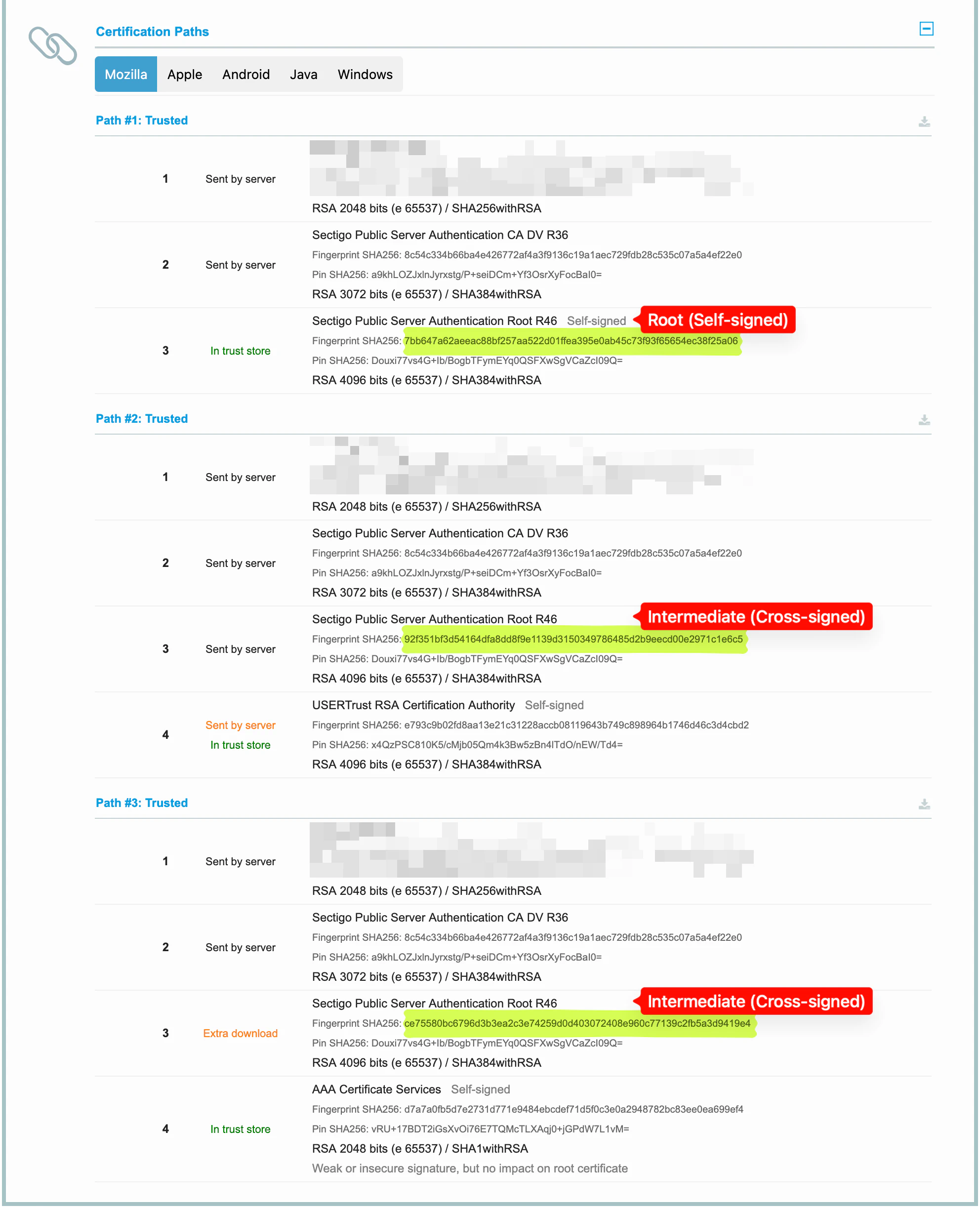
The server certificate (1) was issued by Sectigo Public Server Authentication CA DV R36. Above that, the paths branch out:
| Path | Certificate chain | Root certificate required in the trust store |
|---|---|---|
| Path #1 | Server certificate → Sectigo Public Server Authentication CA DV R36 → Sectigo Public Server Authentication Root R46 | Sectigo Public Server Authentication Root R46 |
| Path #2 | Server certificate → Sectigo Public Server Authentication CA DV R36 → Sectigo Public Server Authentication Root R46 → USERTrust RSA Certification Authority | USERTrust RSA Certification Authority |
| Path #3 | Server certificate → Sectigo Public Server Authentication CA DV R36 → Sectigo Public Server Authentication Root R46 → AAA Certificate Services | AAA Certificate Services |
The root certificate Sectigo Public Server Authentication Root R46 is comparatively new and is missing from older trust stores. Paths #2 and #3, in which R46 is signed by an older root certificate, exist for these clients.
One name, three certificates
Sectigo Public Server Authentication Root R46 appears three times in the example. Despite its name, it is a root certificate only in path #1. In paths #2 and #3, these are separate certificates with the same name and the same key that were issued by a different certificate authority. They are not self-signed and are therefore intermediate certificates:
| Variant | Issuer | Self-signed | Fingerprint SHA256 |
|---|---|---|---|
| Root certificate (path #1) | Sectigo Public Server Authentication Root R46 | yes | 7bb647a62aeeac88bf257aa522d01ffea395e0ab45c73f93f65654ec38f25a06 |
| Intermediate certificate (path #2) | USERTrust RSA Certification Authority | no | 92f351bf3d54164dfa8dd8f9e1139d3150349786485d2b9eecd00e2971c1e6c5 |
| Intermediate certificate (path #3) | AAA Certificate Services | no | ce75580bc6796d3b3ea2c3e74259d0d403072408e960c77139c2fb5a3d9419e4 |
Since the name is the same, the variants can only be distinguished by issuer and fingerprint. The pin (Pin SHA256) is identical for all three, as it is derived from the shared key.
Errors in the example
The server in the example is not configured correctly. In path #2 it also delivers the root certificate USERTrust RSA Certification Authority (Sent by server in orange); in path #3 the variant of R46 signed by AAA Certificate Services is missing (Extra download). Both errors and how to resolve them are described in Check the certificate chain with SSL Labs →. The following sections show the correct chain for all three paths.
Obtain and identify the certificates
In addition to the server certificate, the three paths require the following intermediate certificates:
Sectigo Public Server Authentication CA DV R36Sectigo Public Server Authentication Root R46, issued byUSERTrust RSA Certification AuthoritySectigo Public Server Authentication Root R46, issued byAAA Certificate Services
The certificate authority provides the cross-signed variants on its website. Alternatively, SSL Labs offers the certificates of each path in PEM format via the download icon to the right of the path heading. How intermediate certificates are generally obtained and converted to PEM format is described in Obtain the intermediate certificates from the certificate authority →.
As the file names used by certificate authorities do not always reveal which variant a file contains, each file is checked before use:
openssl x509 -in sectigo-r46-usertrust.pem -noout -subject -issuer -fingerprint -sha256
The issuer line names the issuer, the sha256 Fingerprint line the fingerprint, which must match the table above or the value shown in SSL Labs. OpenSSL displays it in upper case with colons, SSL Labs in lower case without separators. If subject and issuer are identical, the file contains the root certificate; it is not required.
Build the chain
server.pem starts with the server certificate, followed by the intermediate certificate that issued it. The cross-signed variants follow after that. Root certificates are not included – neither the self-signed R46 nor USERTrust RSA Certification Authority or AAA Certificate Services. Clients that know R46 as a root certificate end the path right after Sectigo Public Server Authentication CA DV R36.
After backing up the existing file (e.g. cp server.pem server.pem.old), the chain is combined:
cat server-cert.pem sectigo-dv-r36.pem sectigo-r46-usertrust.pem sectigo-r46-aaa.pem > server.pem
Checking the chain then shows four entries:
openssl crl2pkcs7 -nocrl -certfile server.pem | openssl pkcs7 -print_certs -noout
subject=CN = mdm.example.com
issuer=C = GB, O = Sectigo Limited, CN = Sectigo Public Server Authentication CA DV R36

subject=C = GB, O = Sectigo Limited, CN = Sectigo Public Server Authentication CA DV R36
issuer=C = GB, O = Sectigo Limited, CN = Sectigo Public Server Authentication Root R46

subject=C = GB, O = Sectigo Limited, CN = Sectigo Public Server Authentication Root R46
issuer=C = US, ST = New Jersey, L = Jersey City, O = The USERTRUST Network, CN = USERTrust RSA Certification Authority

subject=C = GB, O = Sectigo Limited, CN = Sectigo Public Server Authentication Root R46
issuer=C = GB, ST = Greater Manchester, L = Salford, O = Comodo CA Limited, CN = AAA Certificate Services
No entry has an identical subject and issuer, so the file does not contain a root certificate. The last two entries have the same subject but differ in their issuer.
Each additional certificate adds about 1.5 to 2 KB to every connection handshake. An additional path is therefore only included if devices or clients are in use whose trust store does not contain the newer root certificate.
Configure nginx
Nothing changes in the nginx configuration: ssl_certificate still points to server.pem, ssl_certificate_key to server.key. nginx delivers all certificates in the file in the order in which they appear there.
server {
    listen 0.0.0.0:443 ssl default_server;
    …

    ssl_certificate      /etc/nginx/server.pem;
    ssl_certificate_key  /etc/nginx/server.key;
    …
}
Two misconceptions are common:
- Multiple
ssl_certificateentries are intended in nginx for certificates with different key types (e.g. RSA and ECDSA), not for alternative chains of the same certificate. ssl_trusted_certificateis used to verify OCSP responses and client certificates. Certificates from this file are not delivered to clients and therefore do not extend the chain.
nginx is restarted so that it reads the modified file:
- Docker installation: Restart the nginx container →
- Native installation on Windows or Linux: Native installation: Renew certificate →
Check the result
Finally, the configuration is checked with SSL Labs as described in Check the certificate chain with SSL Labs →. After a certificate change, a new test is started via Clear cache.
The configuration is correct if, in the Mozilla, Apple, Android, Java and Windows tabs, all intermediate certificates in every path are labelled Sent by server and the last certificate of each path is labelled In trust store only. Extra download must not appear in any path, and no certificate marked Self-signed may also be labelled Sent by server.