 Customer Hub
Data Processing Agreement (DPA)
To ensure full GDPR compliance, the controller must conclude a Data Processing Agreement (DPA) with the operator of the Relution environment (the processor). The new Create DPA function allows this agreement to be configured and signed entirely digitally.
Relution thereby supports an efficient, transparent, and legally compliant conclusion of Data Processing Agreements between Relution GmbH and the customer.
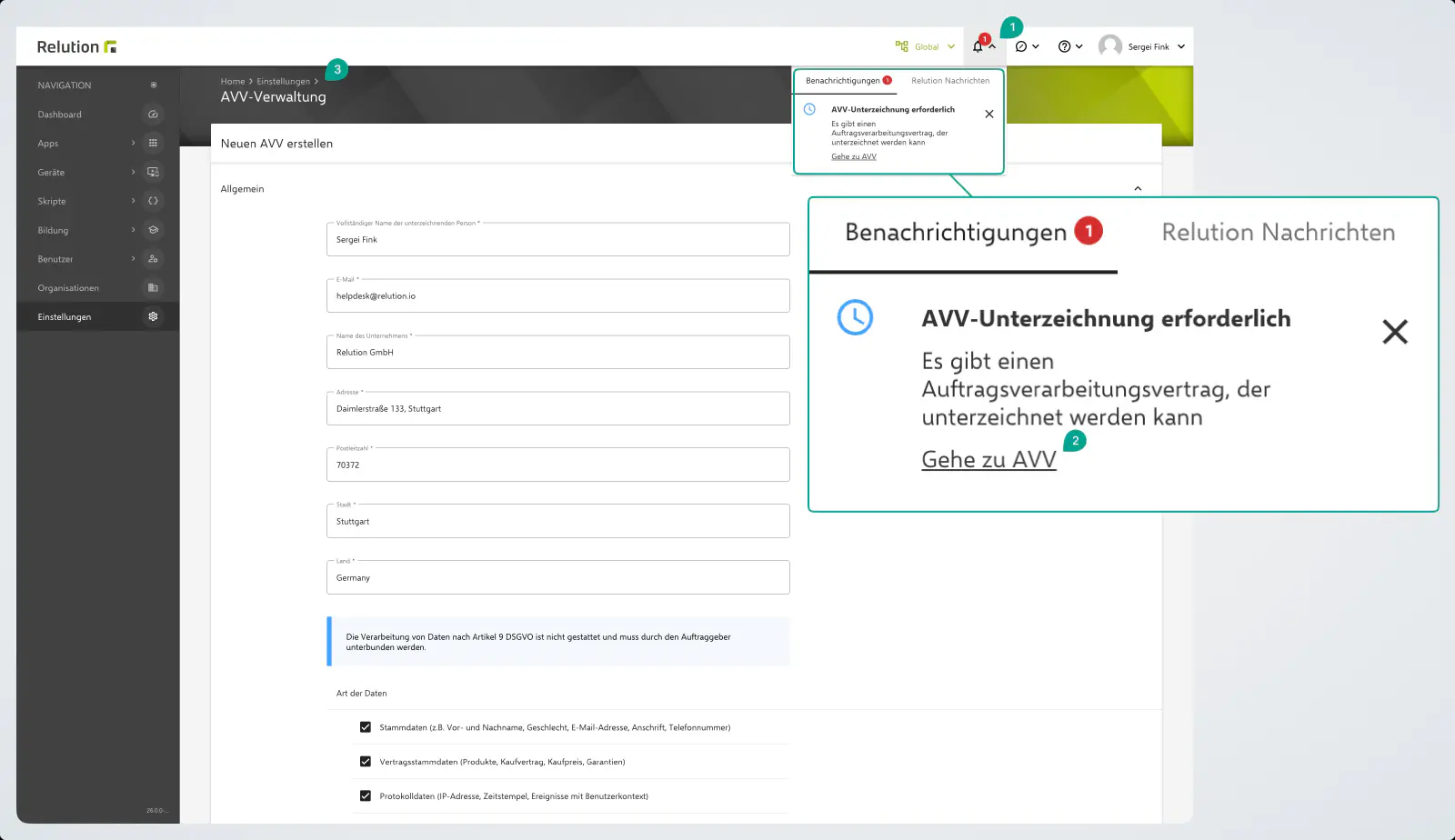
In the notification area (1), a global message is displayed for each organization. This ensures that the DPA can be concluded individually for each tenant or globally for all sub-tenants.
The DPA settings can be accessed in two ways:
- Directly via the notification (1 + 2) in the notification area.
- Via the menu path:
Home→Settings→General / DPA
1. General Information
This section serves to clearly identify the signatory and the legal entity concluding the agreement. The person completing this section must be authorized to sign on behalf of the organization.
| Field | Description |
|---|---|
| Full name of the signing person | The name of the person who signs the agreement in a legally binding manner. |
| The email address of the signing person. | |
| Company name | The official name of the organization (the controller). |
| Address, postal code, city, country | The official address of the organization. |
2. Important Note on Art. 9 GDPR
Please note the highlighted blue notice:
Background: Article 9 GDPR governs special categories of personal data (e.g., health data, ethnic origin, political opinions). Since Relution is an MDM system that primarily processes technical and administrative data, the processing of these highly sensitive data categories is not permitted in standard operation and must be prevented by the customer.
3. Type of Data
This section defines which categories of personal data are processed on behalf of the organization as part of using Relution. Check all applicable categories whose data occurs in the Relution instance:
- Master data (e.g., first and last name, gender, email address, address, phone number)
- Contract master data (products, purchase contract, purchase price, warranties)
- Log data (IP address, timestamp, events with user context)
- User-generated content (e.g., forum posts, feature requests, support requests)
- Device data (device type, device number, IP address, operating system information, installed apps)
- Location data (iBeacons, GPS position, cellular network, WiFi networks)
If needed, further data categories not listed here can be added via Add other.
4. Group of Data Subjects
Select which groups of people are affected by the data processing in the Relution instance:
- Parents and parent representatives
- End customers and suppliers
- Employees (e.g., workers, teachers, trainees, administrative staff)
- Students
Here too, use the Add other function if further groups are affected that are not included in the list.
5. Emergency Contact
Enter here the contact details of the person in the organization who can be contacted immediately in the event of a data breach or other security-relevant emergencies. This information is mandatory.
- Name
- Phone
6. Conclusion and Signature
Before concluding the agreement, two confirmations must be provided:
- Confirmation of signing authority: Confirms that the signer is authorized to conclude the agreement on behalf of the organization.
- Sign for all sub-tenants: This option is relevant if the parent instance (e.g., a school authority) also concludes the agreement for subordinate, managed units (e.g., individual schools).
Once all fields have been filled in correctly and the confirmations have been set, the following actions become available:
- Preview: Review the complete agreement text in advance.
- Sign DPA: Conclude the agreement digitally. The DPA is thereby legally valid.
When the DPA is signed, the agreement details are automatically transmitted to the Relution license server. The following is transmitted:
- the details from the form: signing person and email, company name and address, type of data, group of data subjects, emergency contact, and the Sign for all sub-tenants selection
- the time of signing, the IP address and the Relution user name used for signing
The PDF documents of the DPA are not transmitted to the license server. Without this transmission, the DPA cannot be signed.
Notes on Signing the DPA
If the signatory is not authorized to sign the Data Processing Agreement (DPA), proceed as follows:
- Account creation: Create a separate account for the colleague who is authorized to sign.
- Signing: The colleague can then log in to the portal and sign the DPA independently.
Relution 26.0.0