 Customer Hub
Scheduled OTA Update
The Scheduled OTA update policy enables firmware updates on interactive whiteboards to be carried out automatically outside of usage times.
The configuration is supported on whiteboards from Clevertouch →, i3-Technologies → and Newline. Each policy can contain one configuration of this type.
How it works
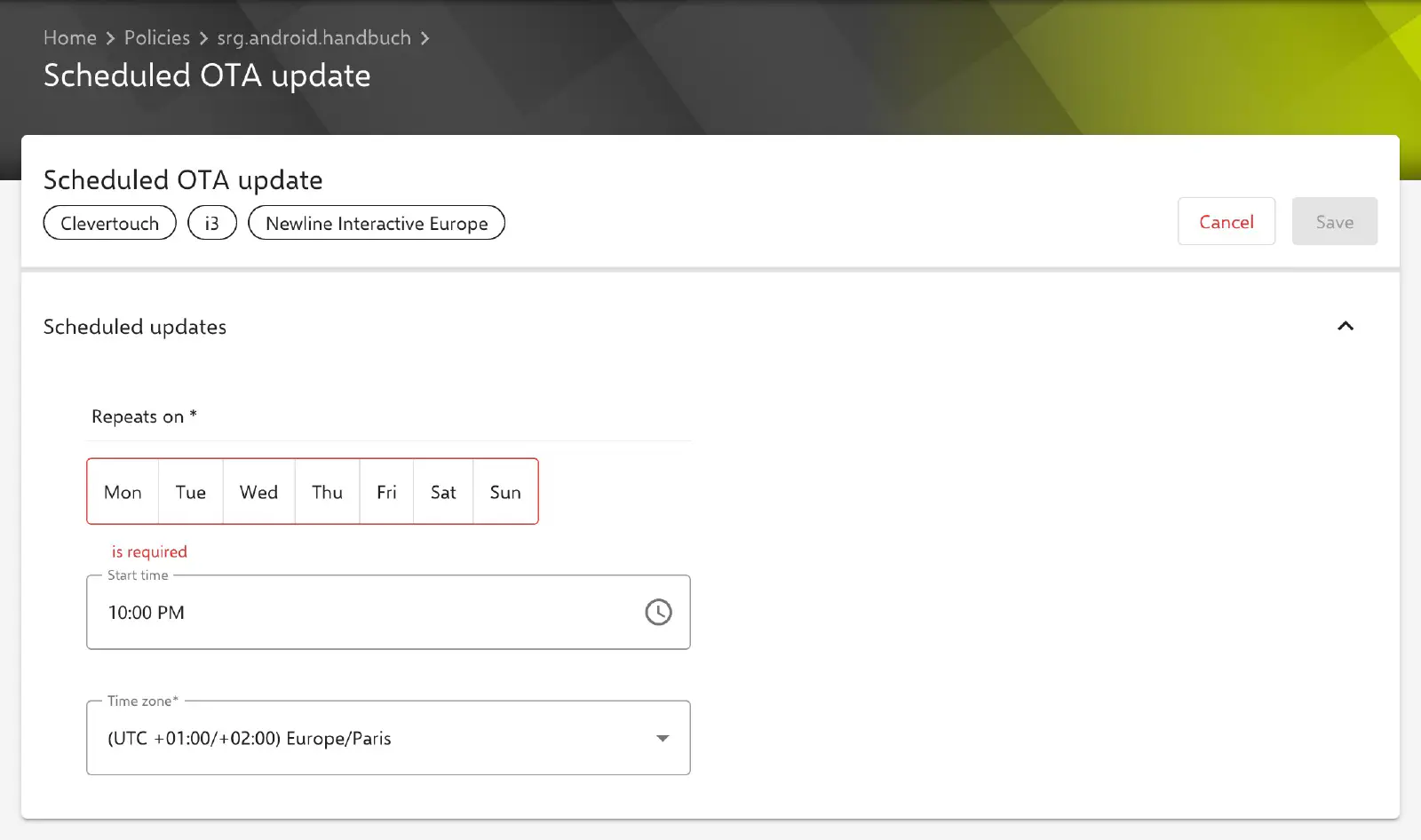
The start of the update window is defined in the Scheduled updates section:
- Repeats on: Days of the week on which the update window starts (multiple selection, at least one day required). No day is preselected in a new configuration.
- Start time: Time at which the update window starts on the selected days (default 22:00 / 10:00 PM). The start time applies to all selected days.
- Time zone: Time zone in which the start time applies (default Europe/Paris). This time zone is decisive, not the local time of the device; this needs to be taken into account for sites in several time zones.
At the specified time, the Relution Companion checks whether a firmware update is available for the device. If an update is available, it is installed automatically and without user interaction.
When updates are not installed
Firmware updates are not installed if the device is switched off at the scheduled time. For example, if the device is not switched on until the next morning and the update window has been missed, Relution Companion waits until the next defined time window to carry out the update. This ensures that updates are only carried out at the scheduled times.