Identity Certificate
Introduction
Apple and Windows devices enrolled in Relution receive an Identity Certificate. This is valid for one year and is automatically renewed as long as active communication with the device exists.
However, it can happen that devices are stored or inactive, preventing the identity certificate from being renewed in time. For security reasons, Relution blocks all communication with the device if the identity certificate has expired.
Checking and Renewing the Identity Certificate
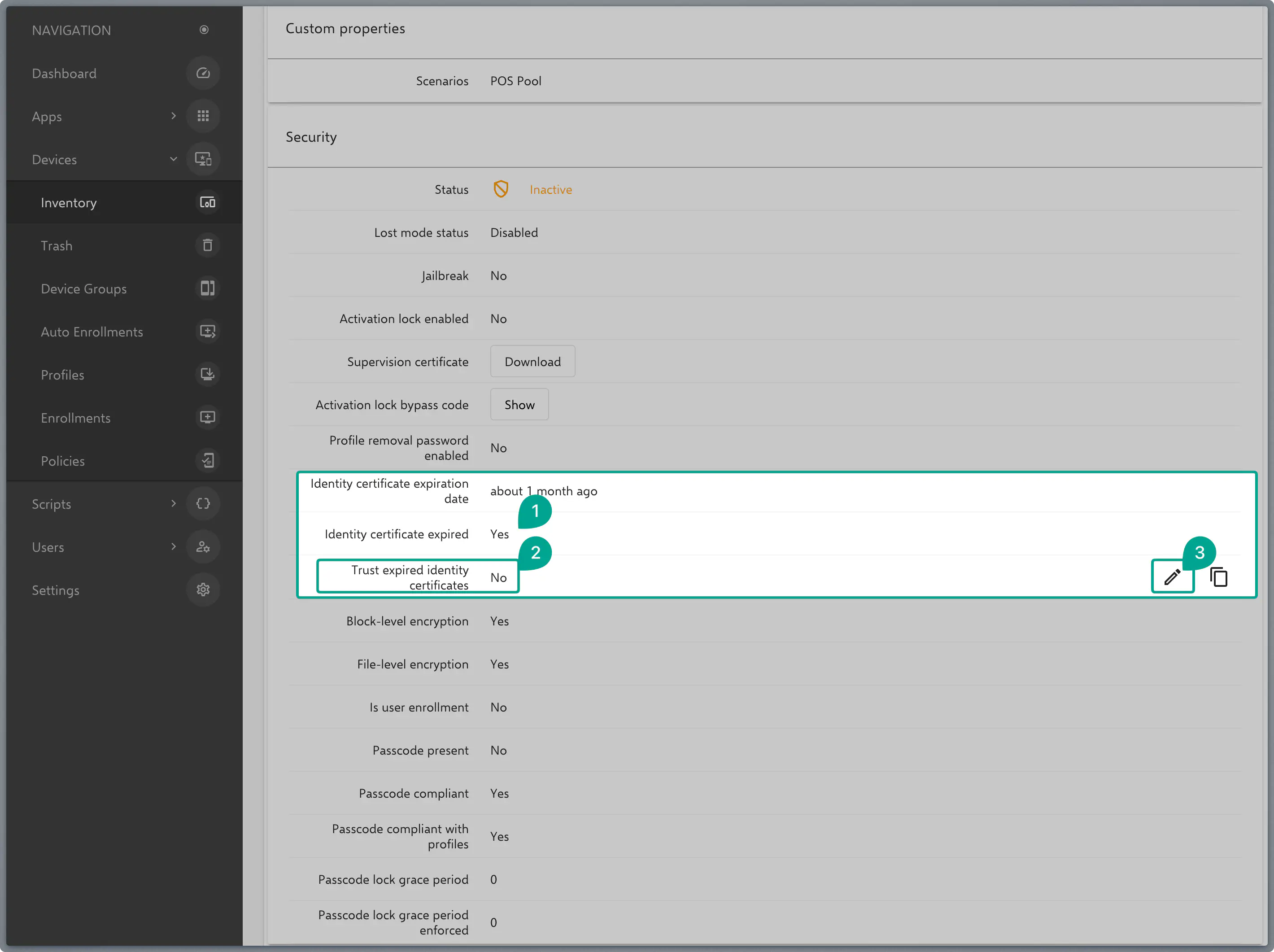
Affected devices can be checked under Navigation → Devices → Inventory → [Your Device] in the Information tab within the Security block.
Here you will find three relevant fields:
- Identity Certificate Expiration Date
- Identity Certificate has expired
- Trust expired identity certificates
If an identity certificate has expired, the edit mode can be activated by hovering the mouse over the point Trust expired identity certificates, and the certificate can be renewed. This action restores the communication with the device as trustworthy, allowing MDM commands to be processed.
Important Note: This action can be performed in the portal at any time. As soon as the devices are online, they will automatically update to the valid certificate.