 Customer Hub
Custom CSP
The MDM interface uses Configuration Service Provider (CSP) policies for managing Windows devices. These policies are applied, removed, and queried on the device using the SyncML Protocol →, a specialized XML-based format. The complete list of available CSP policies can be found in the official Microsoft MDM documentation →.
With the Custom CSP configuration, any combination of CSP policies can be combined into one or more configurations of this type and applied to Windows devices. This means that the functionality available through the MDM interface is only limited by the CSP policies offered by Microsoft. Microsoft continuously extends these policies. An overview of the latest changes is available in the official Microsoft documentation →.
Important Notes
When working with the Custom CSP configuration, the configurations are not implemented by Relution; Relution therefore accepts no liability for any resulting damage. The CSPs used should be reviewed and tested carefully before being applied to a device. Further guidance can be found under Best practices →.
Some CSPs may also be used internally by Relution. In such cases, conflicts can occur that may impair or overwrite Relution-managed configurations.
Functionality
The following specifics of the SyncML protocol need to be considered when using CSP policies.
General
Not all CSP policies can be applied to every device. They depend on the Windows edition and operating system version. Relevant details are provided in the documentation of each individual CSP. If a device does not meet the requirements, deployment of the CSP policy will fail.
CSP policies can be applied in the device or user context →. The user context only applies to the user who enrolled the device. Therefore, it is generally recommended to use CSP policies in the device context.
Not all SyncML commands are supported for every CSP. Some CSPs may be read-only and only support querying (e.g., the Get command).
Example: To allow or block Cortana on a device (already included in the Relution configuration Restrictions), the following CSP can be used: Policy CSP/Experience/AllowCortana →.
- This CSP can be used for all editions and from version 1507 onwards
- Only the device context is supported
- These SyncML commands are allowed: Add (Add), Delete (Delete), Get (Get), Replace (Replace).
Add and Replace
SyncML contains several specifics that need to be considered for the deployment of the configuration.
Some CSP policies must initially be applied using the Add command. For subsequent deployments of the configuration (updates), the Add command may fail if the setting already exists. In such cases, the Replace command must be sent instead, see also Best Practices →.
Delete
A CSP policy can be removed by issuing a Delete command on the specific node. In some cases, it is also possible to delete a parent or root node. In these cases, all CSP policies under the deleted node will be removed.
If the deletion fails, the affected CSP policies remain active on the device. In that case, the Delete SyncML field must be adjusted accordingly. After that, the policy should be reapplied and then removed again.
Atomic and Sequence
The Sequence command allows multiple CSP policies to be grouped and executed sequentially within it. However, if one policy fails, the remaining ones will still be applied. This can lead to inconsistent or unintended behavior. Additionally, the failed CSP policy may need to be explicitly removed.
When the SyncML is executed within an Atomic command, the entire command will be rolled back if any single CSP policy fails. This ensures that either all changes are applied or none at all. Therefore, the Atomic command is preferred and, for the time being, is the only one supported.
In Relution
To apply a custom configuration to Windows devices, the Custom CSP configuration is added to a Windows policy under Devices → Policies. Once the policy is published, the configuration is applied to the devices of the device groups the policy is assigned to (see Policies →).
Each configuration requires two SyncML commands: one in the Install SyncML field for installing or updating the configuration, and one in the Delete SyncML field for removing it. When the configuration is published multiple times, the command in Install SyncML must be adjusted accordingly.
The Custom CSP configuration includes the following properties (all of them mandatory):
| Property | Information |
|---|---|
| Name | Sets a name for the configuration (maximum 255 characters) |
| Install SyncML | The SyncML to be executed when the configuration is applied to the device |
| Delete SyncML | The SyncML to be executed when the configuration is removed from the device |
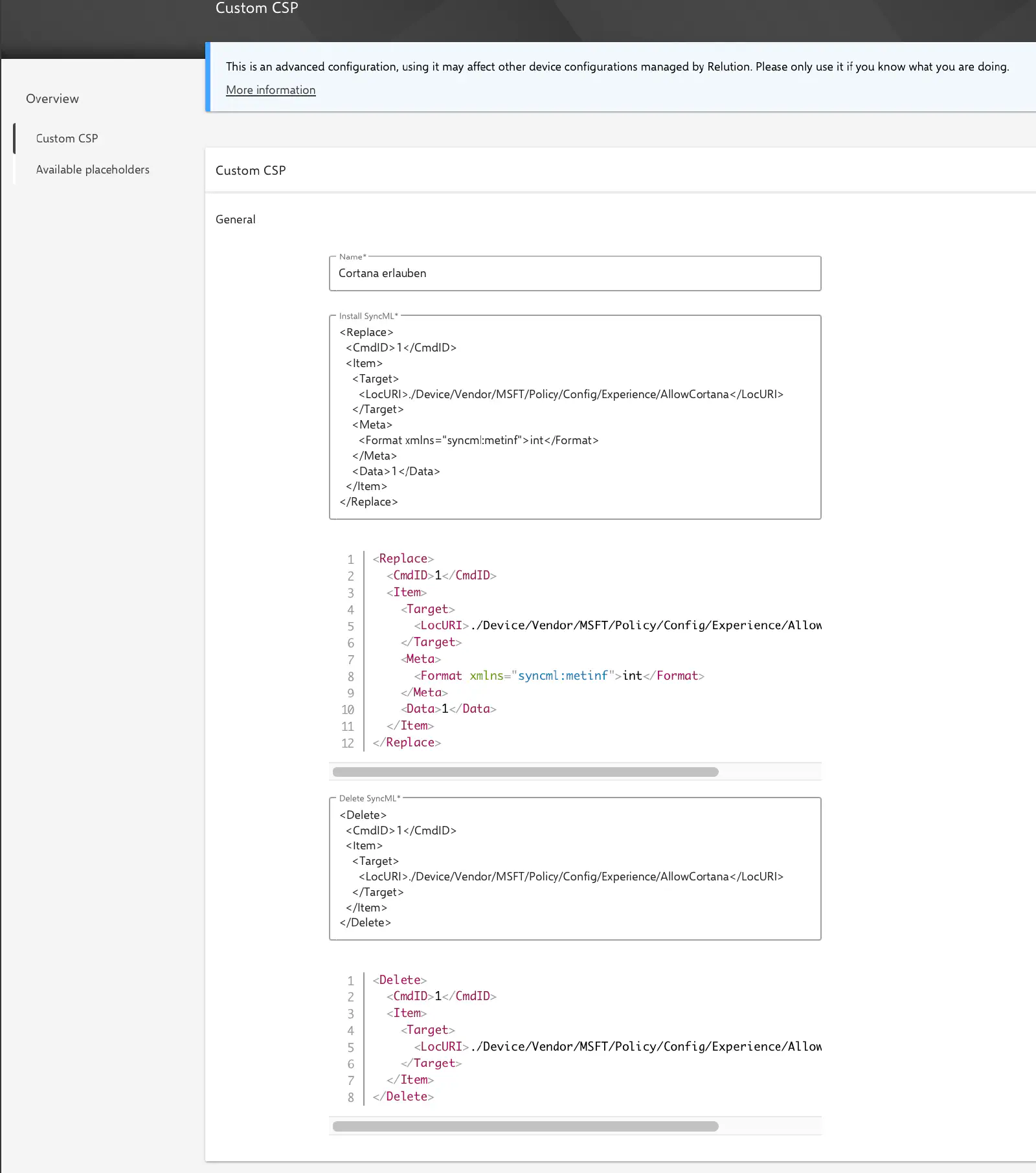
Relution automatically extends the specified SyncML to ensure the configuration can be properly applied, evaluated, and its status displayed in Relution:
- If the specified SyncML contains a
<Format>or<Type>element, the required namespace will be added automatically after saving the configuration. - An Atomic will be wrapped around the specified SyncML. This is necessary to associate the device response with the correct configuration. This occurs when the configuration is delivered.
- The SyncML will be automatically wrapped with the required
SyncBody,SyncHdr, andSyncMLelements to ensure the message is compliant and can be processed by the device. This also occurs at the time of delivery.
<Replace>, <Add>, <Delete>), without the SyncML, SyncHdr or SyncBody elements. If the SyncML contains one of these elements or is not valid SyncML, the configuration is rejected when saving. Complete SyncML messages from the Microsoft documentation therefore have to be reduced to the commands first.Placeholders can be used in both SyncML fields, including certificate placeholders. The available placeholders are shown in the Available placeholders section below the configuration and are replaced with the values of the respective device or user on delivery (see Advanced placeholders →).
Whenever the policies of a device change, for example after a new policy version has been published, Relution sends the Install SyncML of all assigned Custom CSP configurations again, even if the configuration itself is unchanged. Unlike other Windows configurations, the state on the device is not queried beforehand. An Add command can therefore fail on subsequent deliveries (see Best Practices →).
If the configuration fails on the device, Relution reports a compliance violation of the type Custom CSP configuration on the device.
Examples
Policy CSP/Experience/AllowCortana →
- Allow Cortana
Install SyncML:
<Replace>
  <CmdID>1</CmdID>
  <Item>
    <Target>
      <LocURI>./Device/Vendor/MSFT/Policy/Config/Experience/AllowCortana</LocURI>
    </Target>
    <Meta>
      <Format>int</Format>
    </Meta>
    <Data>1</Data>
  </Item>
</Replace>
- Block Cortana
Install SyncML:
<Replace>
  <CmdID>1</CmdID>
  <Item>
    <Target>
      <LocURI>./Device/Vendor/MSFT/Policy/Config/Experience/AllowCortana</LocURI>
    </Target>
    <Meta>
      <Format>int</Format>
    </Meta>
    <Data>0</Data>
  </Item>
</Replace>
- Remove the CSP policy AllowCortana from the device
Delete SyncML:
<Delete>
  <CmdID>1</CmdID>
  <Item>
    <Target>
      <LocURI>./Device/Vendor/MSFT/Policy/Config/Experience/AllowCortana</LocURI>
    </Target>
  </Item>
</Delete>
Best Practices
- An update of the configuration can be applied by creating a new policy version (possibly with an adjusted Install SyncML).
- If deletion fails, the included CSP policies will remain active on the device. In this case, the Delete SyncML must be revised, and the policy should be reapplied and then removed again.
- It is recommended to use Replace instead of Add unless the corresponding CSP policy does not support it.
- If a Replace command is not permitted for the initial deployment of a CSP policy, it is recommended to first apply the configuration using an Add command. Afterwards, the configuration’s Install SyncML should be switched from Add to Replace and deployed again using a new policy version.
- It is recommended to extensively test the desired behavior on suitable test devices. At a minimum, the following scenarios should be tested:
- Initial deployment of the configuration
- Updating the configuration
- Deleting the configuration
Sample Policies
A comprehensive example of custom policies has been published on the Relution Community Board: Relution Community Board - Custom CSP →.
Many thanks to the community for this valuable contribution.