 Customer Hub
The E-mail configuration sets up a POP3 or IMAP4 account including an outgoing mail server (SMTP) on Windows devices. Relution transfers the settings via the Windows configuration service provider EMAIL2. Username and email address can be filled per user via placeholders.
For accounts on a Microsoft Exchange Server via Exchange ActiveSync, the Exchange → configuration is intended instead (see Comparison with Exchange →).
Characteristics
- Several e-mail configurations are allowed per policy, for example for several mailboxes.
- The portal does not state any restriction to specific Windows editions or versions for this configuration.
- Only emails are synchronized. Contacts, calendars and tasks are not synchronized via this configuration.
- Account name and Account type can no longer be changed after the configuration has been created. For a different account name or account type, a new configuration is created.
- If the configuration is removed from the policy, Relution deletes the account on the device.
- If the setup fails on a device, the violation Email configuration appears in the device’s compliance.
Below the form, the portal lists the available placeholders, e.g. ${user.email} or ${user.name}. On delivery, they are filled with the data of the user assigned to the device. More information: Advanced placeholders →
Account Settings
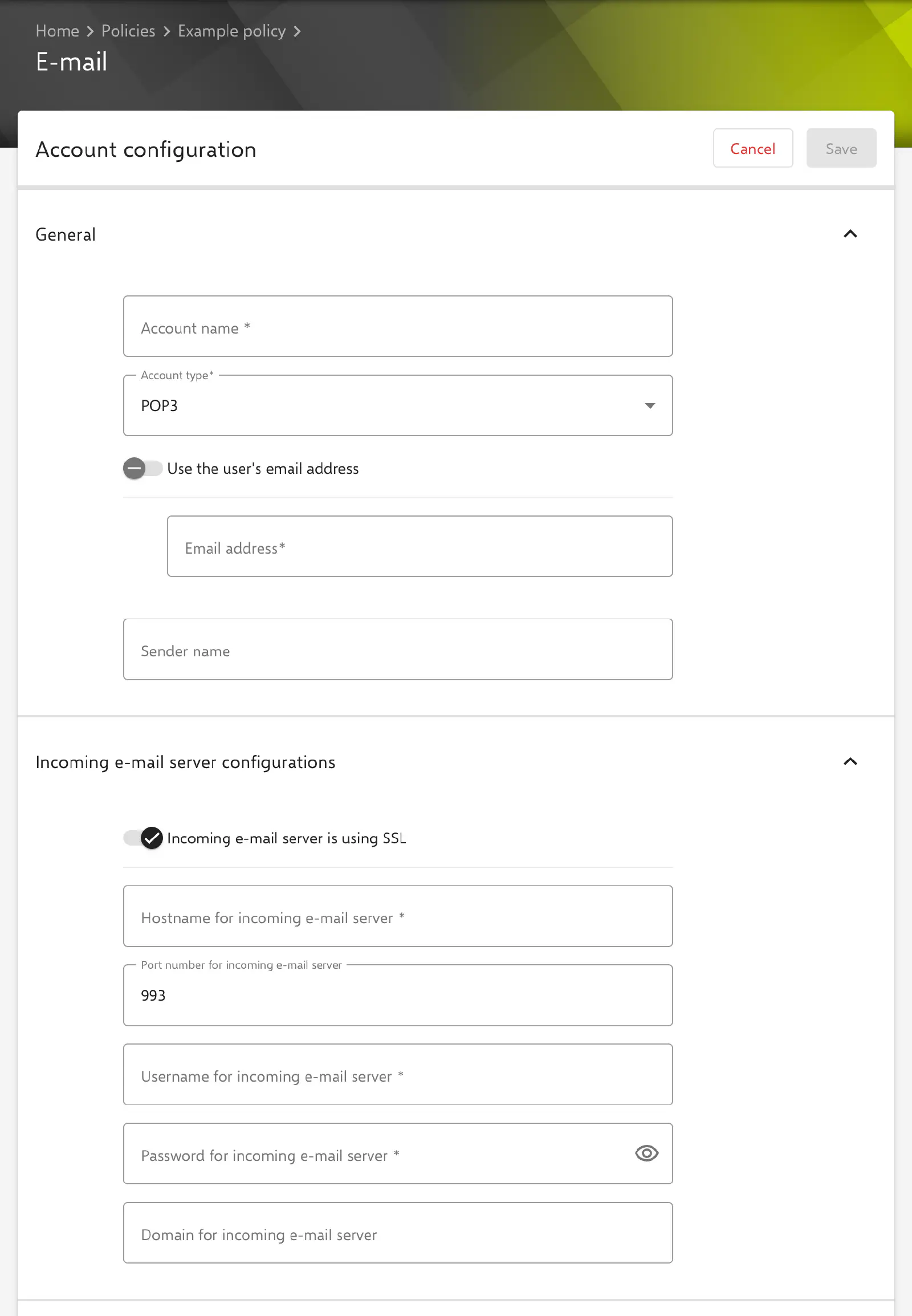
The Account configuration section contains the account data in the General area.
- Account name (required, max. 32 characters): Name under which the account is created on the device. Leading and trailing spaces are not allowed.
- Account type (required): POP3 (default) or IMAP4.
- Use the user’s email address: If the switch is enabled, the Email address field is locked and filled with the placeholder
${user.email}. - Email address (required, max. 255 characters): Reply address of the account. A fixed email address or a placeholder is allowed.
- Sender name (optional, max. 255 characters): Sender name shown in sent messages. If the field is left empty, no sender name is transferred.
Incoming Mail Server
The Incoming e-mail server configurations section describes the POP3 or IMAP4 server.
- Incoming e-mail server is using SSL: Enabled by default.
- Hostname for incoming e-mail server (required, max. 62 characters): Hostname without protocol and without port. Relution transfers it together with the port number in the format
<hostname>:<port>. - Port number for incoming e-mail server: Value between 1 and 65535, default
993. The default corresponds to the usual port for IMAP over SSL. For POP3 over SSL,995is usually common; the mail server’s specification is decisive. - Username for incoming e-mail server (required): Logon name for the incoming mail server; placeholders such as
${user.name}are possible. - Password for incoming e-mail server (required when creating): A stored password is no longer displayed; the field then shows
*****. If it is left unchanged, the stored password is kept. - Domain for incoming e-mail server (optional, max. 255 characters): Domain of the credentials, if the mail server requires it.
Outgoing Mail Server
The Outgoing e-mail server configurations section describes the SMTP server.
- Outgoing server is using SSL: Enabled by default.
- Use hostname from the incoming e-mail server: Can be enabled as soon as a valid Hostname for incoming e-mail server has been entered. If the switch is enabled, the incoming server’s hostname is applied and the Hostname for outgoing e-mail server field is locked.
- Hostname for outgoing e-mail server (required): Hostname without protocol and without port, transferred in the format
<hostname>:<port>. - Port number for outgoing e-mail server (required): Value between 1 and 65535, default
465. - Outgoing e-mail server requires authentication: Defines whether the outgoing mail server requires a logon. Disabled for new configurations. If the option is enabled and no alternative account is set up, the device uses the same credentials as for the incoming mail server.
- Use alternative SMTP outgoing e-mail account: Only available if Outgoing e-mail server requires authentication is enabled; disabled for new configurations. If the switch is enabled, separate credentials are used for sending:
- Alternative SMTP account username (required)
- Alternative SMTP account password (required when creating): Same behavior as the incoming mail server password.
- Alternative SMTP account domain (optional, max. 255 characters)
If Outgoing e-mail server requires authentication is disabled, the form disables the alternative account and clears its fields.
Synchronization
The Synchronization settings section controls the scope and frequency of synchronization.
- Synchronization period (required): All, Not older than a week (default), Not older than two weeks or Not older than a month.
- Synchronization interval (required): Manual, Every 15 minutes (default), Every 30 minutes, Every hour or Every 2 hours.
- Delete mail behaviour (required): Default (default), Delete mail from server or Delete mail locally but not from server.
- Synchronize only in mobile network: Disabled by default. If the option is enabled, the account uses only the cellular network and no Wi-Fi.
- Maximum attachment size (in KB): Only shown and transferred if Account type is IMAP4. Unlimited, 25 KB, 50 KB, 125 KB or 250 KB (default). Larger attachments are not downloaded and remain on the server; the message itself is downloaded.
- Maximum message size (in GB): 1 GB, 2 GB, 5 GB, 20 GB (default) or 50 GB. Larger messages are retrieved but truncated. Relution transfers the numeric value of the selection (
1024to51200), which Microsoft documents in bytes for this setting.
According to a note in the portal, Windows does not take Synchronization interval into account when a POP3 or IMAP4 account is initially created, nor Synchronization period when a POP3 account is initially created. At first, all emails are therefore synchronized; the settings take effect after the first synchronization has finished. This behavior is determined by Microsoft and may change with new Windows versions.
Comparison with Exchange
| Characteristic | Exchange | |
|---|---|---|
| Protocol | POP3 or IMAP4, sending via SMTP | Exchange ActiveSync |
| Synchronized content | emails only | emails, contacts, calendars, tasks |
| Secure Mail Gateway | not available | optional |