 Customer Hub
Global proxies
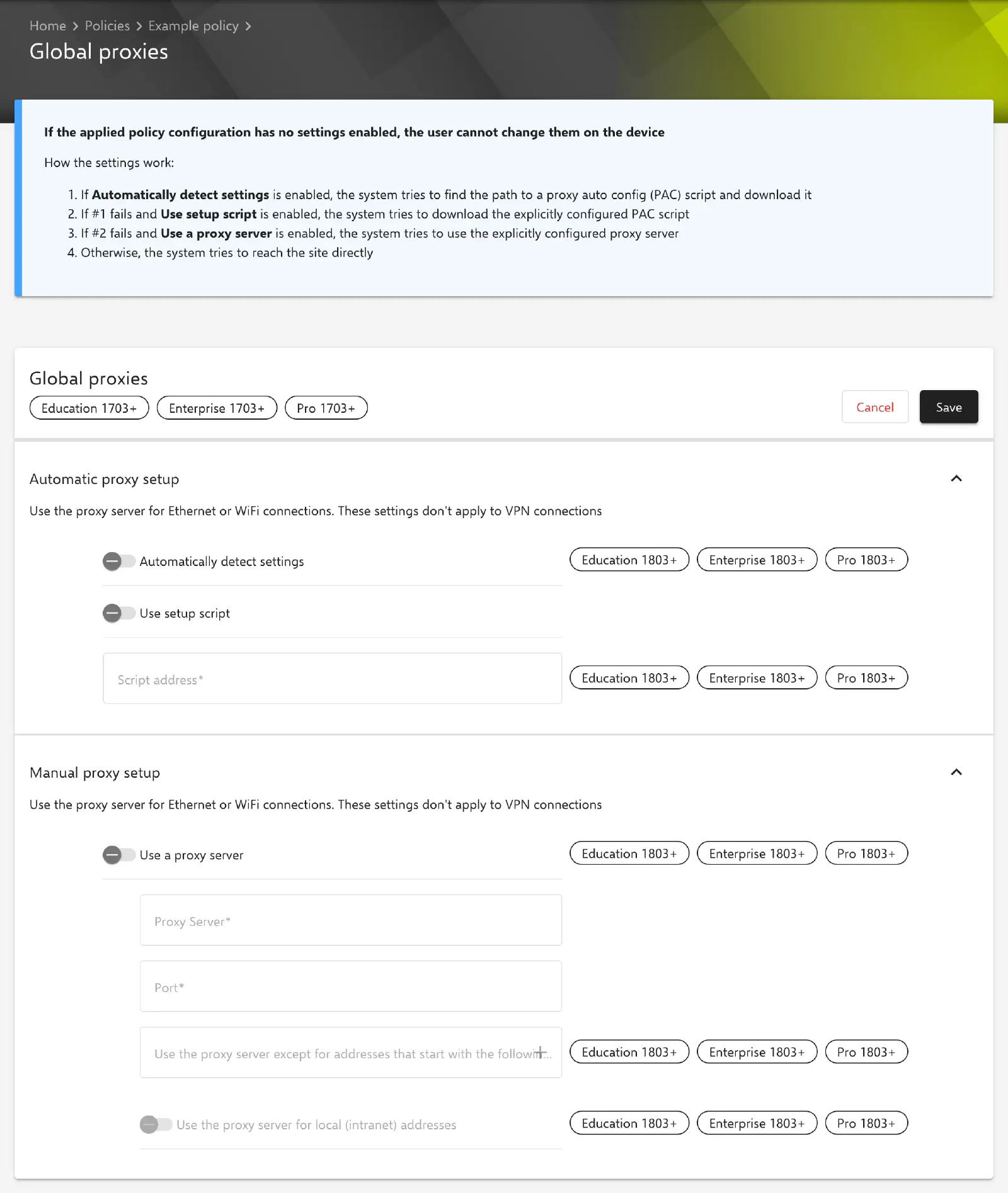
The Global proxies policy configuration defines the proxy settings of managed Windows devices centrally: automatically through detection of a proxy script or a specified PAC script (proxy auto config), or manually through a fixed proxy server. Relution transfers the settings through Microsoft’s NetworkProxy CSP →.
The settings apply to Ethernet and Wi-Fi connections, not to VPN connections. A proxy for a VPN connection is defined in the VPN → configuration.
Prerequisites
- Windows 10 or Windows 11 in the Pro, Enterprise or Education edition, version 1703 or later. Windows Home is not supported.
- The options Automatically detect settings, Script address, Use a proxy server, the exception list and Use the proxy server for local (intranet) addresses are marked with Windows version 1803 or later in the portal.
- Only one Global proxies configuration is possible per policy.
How it works
Windows evaluates the enabled options in the following order (hint in the portal):
- If Automatically detect settings is enabled, the system searches for a PAC script and downloads it.
- If this fails and Use setup script is enabled, the system downloads the PAC script specified under Script address.
- If this also fails and Use a proxy server is enabled, the system uses the manually specified proxy server.
- Otherwise, the website is accessed directly.
According to a hint in the portal, if none of the options is enabled in the applied configuration, the proxy settings cannot be changed by the user on the device.
Automatic proxy setup
| Field | Description |
|---|---|
| Automatically detect settings | Disabled by default. Windows determines the proxy settings itself through a PAC script provided in the network |
| Use setup script | Disabled by default. Enables the Script address field; when disabled, its content is cleared |
| Script address | Required as soon as Use setup script is enabled. Address of the PAC script, e.g. http://proxy.example.com/proxy.pac; specifying the protocol is optional, the host name has to contain a dot |
Manual proxy setup
| Field | Description |
|---|---|
| Use a proxy server | Disabled by default. Enables the following fields; when disabled, their values are reset |
| Proxy Server | Required. Host name or IP address of the proxy server without port, e.g. proxy.example.com or 10.0.0.1. Host names without a dot (e.g. proxy) are not accepted by the portal |
| Port | Required, value 1–65535, prefilled with 80. Relution transfers server and port together to the device in the format Proxy Server:Port |
| Use the proxy server except for addresses that start with the following entries | Optional, multiple entries possible. The proxy server is bypassed for addresses that start with one of these entries. The entries are transferred to the device separated by ; |
| Use the proxy server for local (intranet) addresses | Disabled by default: local addresses are reached without the proxy server. If the option is enabled, traffic to local addresses also passes through the proxy server |
Special notes
- Applies to all users: Relution defines the proxy settings device-wide (
ProxySettingsPerUser=0). User-specific proxy settings are not provided for by this configuration. - Disabled options are removed: If Use setup script or Use a proxy server is disabled, Relution deletes the associated values on the device. The same applies to an empty exception list.
- Removing the configuration: If the configuration is removed from the device, all proxy settings it has set are deleted.
- Vendor behavior: How Windows searches for and evaluates a PAC script is decided by the operating system. Microsoft describes the details in the documentation of the NetworkProxy CSP.
Related topics
- VPN → — proxy settings for VPN connections.
- Wi-Fi → — Wi-Fi networks for Windows devices.
- Available configurations → — all policy configurations for Windows.
- Policies explained → — structure and assignment of policies.